AI chatbots hallucinate in 3 to 20 percent of responses depending on the domain, according to Stanford HAI, 2025. That error rate cost enterprises an estimated $67.4 billion in 2024, according to Korra, 2024. This tutorial shows you how to add real-time fact verificationing to any AI chatbot using a verification API, with working code examples you can deploy today.
- Chatbot hallucinations affect 3-20% of responses and cost enterprises $67.4 billion in 2024.
- A verification API checks each claim against real sources before the user sees it.
- Adding verifying requires fewer than 30 lines of code in most chatbot frameworks.
- Webcite returns a verdict, confidence score, and citations in a single API call.
- Asynchronous verification lets you verification without adding noticeable latency.
Why Do AI Chatbots Hallucinate?
Large language models generate text by predicting the next likely token, not by consulting a database of verified facts. This architecture means that every response carries some probability of fabrication, even when the model sounds confident.
The problem compounds in production chatbots. A Stanford study found that even RAG-powered legal AI tools from LexisNexis and Thomson Reuters hallucinate in 17 to 33 percent of queries, according to Stanford Law, 2025. RAG reduces hallucinations compared to vanilla LLMs, but it does not eliminate them.
Three factors make chatbot hallucinations particularly dangerous. First, users trust chatbots more than search results because the response feels authoritative. Second, chatbots rarely qualify their answers with “I’m not sure.” Third, hallucinated responses look identical to accurate ones; there is no visual signal that something is wrong.
Air Canada learned this the hard way when its chatbot invented a “bereavement fare” policy that did not exist, according to CBC News, 2024. A tribunal forced the airline to honor the fabricated discount. The cost was not just the refund; it was the headline risk.
Why Guardrails and Prompt Engineering Are Not Enough
Most teams start with prompt engineering: “Only answer based on the provided context” or “If you don’t know, say you don’t know.” These instructions help, but they do not eliminate hallucinations.
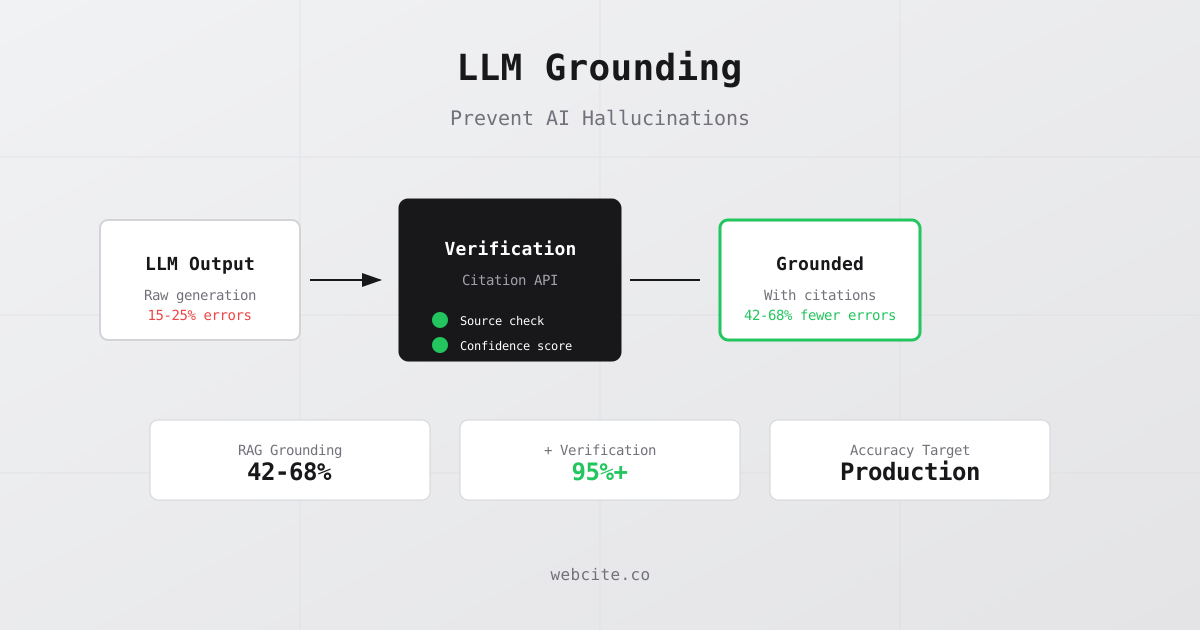
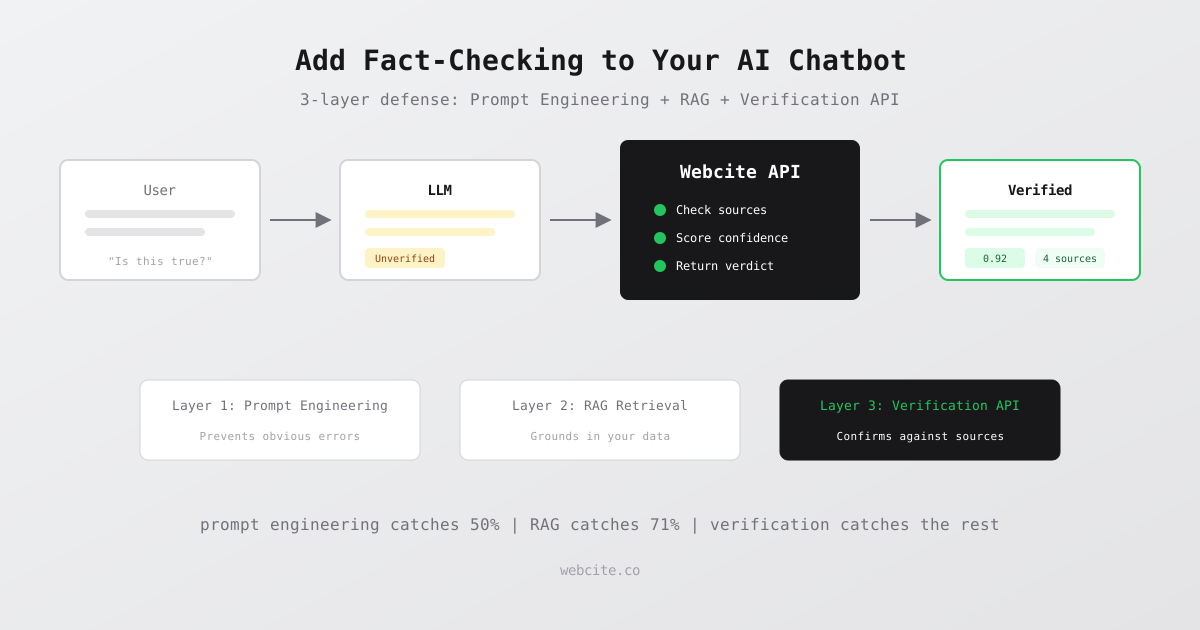
RAG helps more. By grounding the model in retrieved documents, you reduce the hallucination rate significantly. Google’s 2025 research shows RAG cuts hallucinations by 71 percent when properly implemented, according to AllAboutAI, 2026. But 71 percent is not 100 percent.
The remaining 29 percent is where verification APIs come in. A verification API does something fundamentally different from a guardrail: it checks claims against external sources and returns evidence. Guardrails filter based on rules. Verification APIs confirm based on facts.
Think of it as a three-layer defense:
- Prompt engineering and system instructions (prevents obvious errors)
- RAG retrieval (grounds responses in your data)
- Verification API (confirms claims against external sources)
Each layer catches errors the previous layer missed.
How a Verification API Fits into Your Chatbot
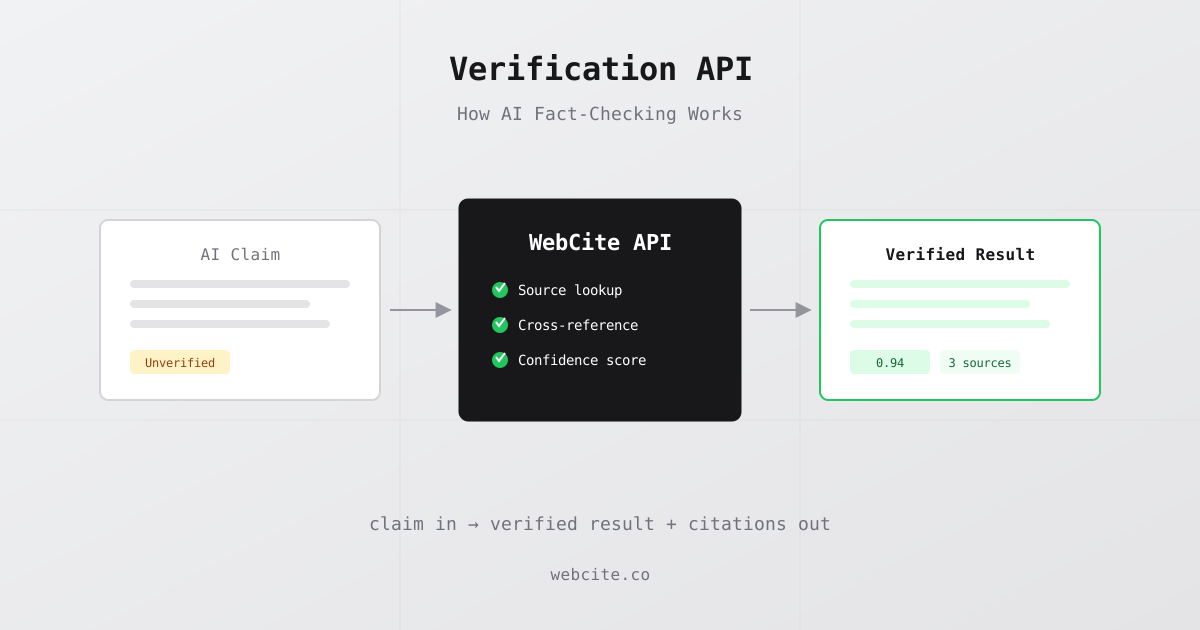
The integration pattern is straightforward. Your chatbot generates a response, you send that response (or specific claims from it) to the verification API, and you use the result to decide what to show the user.
Here is the architecture:
User question → LLM generates response → Extract claims → Verify each claim → Return verified response
The verification step adds a decision point. For each claim, the API returns one of three verdicts: supported, contradicted, or insufficient evidence. You decide what to do with each:
- Supported claims pass through unchanged, optionally with citations
- Contradicted claims get flagged, removed, or regenerated
- Insufficient evidence claims get a disclaimer
Step-by-Step: Adding Webcite Verification to Your Chatbot
Here is a working implementation. This example uses Node.js, but the pattern applies to any language since Webcite is a REST API.
Step 1: Extract Claims from the Chatbot Response
function extractClaims(response) {
  // Split response into sentences, filter for factual claims
  const sentences = response.split(/[.!?]+/).filter(s => s.trim().length > 20)
  // Keep sentences with numbers, dates, or proper nouns (likely factual)
  return sentences.filter(s =>
    /\d/.test(s) || /[A-Z][a-z]{2,}/.test(s.trim().slice(1))
  )
}
Step 2: Verify Each Claim Against Real Sources
async function verifyClaim(claim) {
  const response = await fetch("https://api.webcite.co/api/v1/verify", {
    method: "POST",
    headers: {
      "x-api-key": process.env.WEBCITE_API_KEY,
      "Content-Type": "application/json"
    },
    body: JSON.stringify({
      claim: claim,
      include_stance: true,
      include_verdict: true
    })
  })
  return response.json()
}
Step 3: Build the Verified Response
async function verifyResponse(chatbotResponse) {
  const claims = extractClaims(chatbotResponse)
  const results = await Promise.all(claims.map(verifyClaim))

  let verified = chatbotResponse
  const citations = []
  const warnings = []

  results.forEach((result, i) => {
    if (result.verdict?.result === "supported") {
      citations.push(...(result.citations || []))
    } else if (result.verdict?.result === "contradicted") {
      warnings.push(claims[i].trim())
    }
  })

  return { text: verified, citations, warnings }
}
Step 4: Integrate into Your Chat Handler
app.post("/api/chat", async (req, res) => {
  const { message } = req.body

  // Generate LLM response (using your existing pipeline)
  const llmResponse = await generateResponse(message)

  // Verify claims before sending to user
  const { text, citations, warnings } = await verifyResponse(llmResponse)

  res.json({
    response: text,
    sources: citations.map(c => ({ title: c.title, url: c.url })),
    unverified_claims: warnings
  })
})
This adds fewer than 30 lines to your existing chatbot code.
Handling Latency: Synchronous vs Asynchronous Verification
Verification API calls typically take 1-3 seconds. For some chat interfaces, that is acceptable. For others, you need faster responses.
Three patterns handle this:
Synchronous verification checks claims before showing the response. Best for high-stakes domains like healthcare, legal, and finance where accuracy matters more than speed.
Asynchronous verification shows the response immediately, then appends citations and warnings after verification completes. Best for general-purpose chatbots where speed matters.
Selective verification only checks responses containing numbers, dates, or medical terms. This reduces API calls by 60-80 percent while still catching the highest-risk hallucinations.
A survey of enterprise AI teams found that 76 percent now include human-in-the-loop processes to catch hallucinations before deployment, according to AllAboutAI, 2026. Verification APIs automate that human review step.
Cost Analysis: Is Verificationing Worth It?
Webcite offers 50 free credits per month. Each verification uses 4 credits (2 for citation retrieval, 1 for stance detection, 1 for verdict). That gives you 12 free verifications per month for testing.
The Builder plan at $20/month provides 500 credits, enough for 125 verifications. If your chatbot handles 1,000 conversations per month and you selectively verify 10 percent of responses (those with factual claims), that is 100 verifications, well within the Builder plan.
Compare that to the alternative. Employees spend an average of 4.3 hours per week verifying AI-generated content, costing approximately $14,200 per employee annually, according to Korra, 2024. A $20/month API replaces a significant portion of that manual review.
Enterprise plans start at 10,000+ credits per month for high-volume chatbots. At scale, the cost per verification drops below $0.02.
What Fact verificationing Catches That RAG Misses
RAG grounds the model in your documents, but it has blind spots. A RAG system will confidently cite your documentation even when the documentation itself is outdated or the model misinterprets the retrieved passage.
Verification APIs catch three categories of errors that RAG misses:
Outdated claims. Your internal documentation says the product costs $15/month, but you raised prices last quarter. RAG will confidently cite the old price. Verification against external sources catches the discrepancy.
Misattributed statistics. The model retrieves a real statistic but attributes it to the wrong source or gets the number slightly wrong. Verification cross-references the claim against the original source.
Hallucinated specifics. The model generates a plausible-sounding claim with a fake source citation that does not exist. RAG will not catch this because it was not retrieved from a document; it was generated by the model. Verification API calls will flag it as unsupported.
These are the errors that erode user trust because they look completely real.
Frequently Asked Questions
How do I add verifying to an AI chatbot?
Send each chatbot response to a verification API before showing it to users. The API checks claims against real sources and returns a verdict with citations. If a claim is unsupported, you can flag it, remove it, or ask the model to regenerate. The integration requires fewer than 30 lines of code with any REST API client.
Does verificationing slow down chatbot responses?
A verification API call typically adds 1-3 seconds of latency. You can mitigate this by checking claims asynchronously (show the response first, append citations after), caching frequent verifications, or only verifying high-risk responses like those containing numbers, dates, or medical claims.
What is the cost of adding fact verificationing to a chatbot?
Webcite offers a free tier with 50 credits per month. Each verification uses 4 credits. The Builder plan at $20/month provides 500 credits, enough for 125 verifications per month. For high-volume chatbots, Enterprise plans start at 10,000+ credits with per-verification costs below $0.02.
Can I verify chatbot responses in real time?
Yes. Verification APIs like Webcite return results in 1-3 seconds, fast enough for synchronous checking in most chat interfaces. For sub-second requirements, verify asynchronously and append citations after the initial response loads.
What types of chatbot errors does a verification API catch?
Verification APIs catch factual errors that guardrails and RAG miss: outdated claims, misattributed statistics, hallucinated specifics, and fabricated citations. They work by checking each claim against external real-world sources, not just your internal documents.