Postman’s 2025 State of the API Report found that 82 percent of organizations now describe themselves as API-first, according to Postman, 2025. For developers integrating a verification API, the response format determines how quickly you can ship. This article provides a field-by-field breakdown of the Webcite verification API response schema, with parsing examples in JavaScript, Python, and Go, plus a comparison against Tavily and Perplexity API response formats.
- The Webcite verify endpoint returns a verdict object, citations array, and stance detection in a single JSON response.
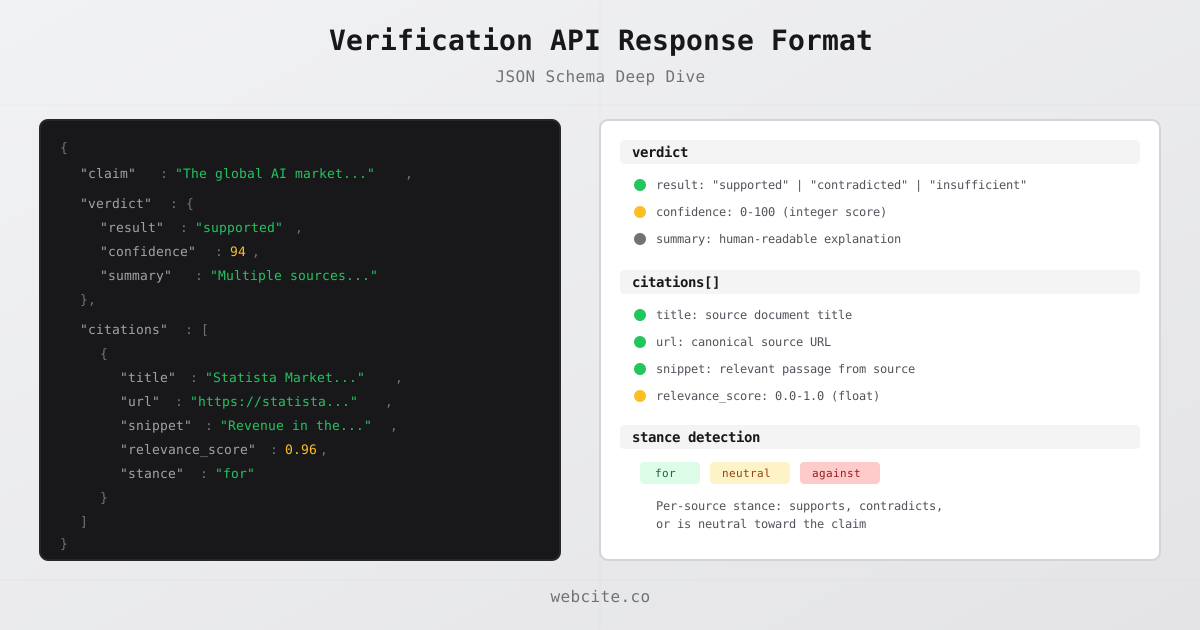
- Each citation includes title, url, snippet, relevance_score (0.0 to 1.0), and stance (for, against, neutral).
- The verdict object contains 3 possible results: supported, contradicted, or insufficient.
- Confidence scores range from 0 to 100 and reflect source agreement strength.
- Error responses follow RFC 9457 conventions with machine-readable error codes.
Full JSON Response Schema
The Webcite verification API returns a predictable JSON structure from every successful call to the POST /api/v1/verify endpoint. Understanding each field lets you build robust integrations without guesswork.
Here is the complete response schema:
{
  "claim": "The global AI market reached $254 billion in 2025",
  "verdict": {
    "result": "supported",
    "confidence": 94,
    "summary": "Multiple credible sources confirm this market size estimate."
  },
  "citations": [
    {
      "title": "Statista AI Market Forecast",
      "url": "https://www.statista.com/forecasts/1474143/global-ai-market-size",
      "snippet": "Revenue in the AI market is projected to reach US$254.50bn in 2025.",
      "relevance_score": 0.96,
      "stance": "for"
    },
    {
      "title": "IDC Worldwide AI Spending Guide",
      "url": "https://www.idc.com/promo/ai-spending-guide",
      "snippet": "Global spending on AI systems surpassed $250 billion in 2025.",
      "relevance_score": 0.89,
      "stance": "for"
    },
    {
      "title": "Bloomberg Intelligence AI Report",
      "url": "https://www.bloomberg.com/ai-market-analysis",
      "snippet": "The AI market reached approximately $250-260 billion by year end.",
      "relevance_score": 0.82,
      "stance": "for"
    }
  ],
  "totalResults": 3
}
Every field in this response serves a specific integration purpose. The claim field echoes back the input for request-response correlation. The verdict object provides the machine-readable determination. The citations array provides the evidence. And the totalResults field gives a count for display logic.
The Stack Overflow 2025 Developer Survey found that 84 percent of developers now use AI tools in their workflow, according to Stack Overflow, 2025. As AI-generated content scales, structured verification responses become the interface between generated text and trustworthy output.
The Verdict Object
The verdict object is the core decision payload. It contains three fields that tell your application whether a claim held up against real-world sources.
result is a string enum with three possible values:
| Value | Meaning | When returned |
|---|---|---|
"supported" |
Sources confirm the claim | 2+ credible sources agree |
"contradicted" |
Sources dispute the claim | 1+ credible sources disagree, none support |
"insufficient" |
Not enough evidence found | Fewer than 2 relevant sources located |
The result field is deterministic. Your application can switch on it directly without parsing natural language or interpreting probabilities:
switch (result.verdict.result) {
  case "supported":
    showWithCitations(result.citations)
    break
  case "contradicted":
    flagForReview(result.claim, result.verdict.summary)
    break
  case "insufficient":
    addDisclaimer(result.claim)
    break
}
confidence is an integer from 0 to 100 representing how strongly the available evidence supports the verdict. A confidence of 94 means several strong, independent sources agree. A confidence of 45 means the evidence is mixed or thin. This score factors in source count, source credibility, and source agreement.
Use confidence to implement tiered display logic. Claims above 80 might show a green checkmark. Claims between 50 and 80 get a yellow warning. Claims below 50 get flagged regardless of the verdict result.
summary is a human-readable string explaining the verdict. It is designed for display to end users who want to understand why a claim was rated a certain way. This field is not intended for programmatic parsing; use the result and confidence fields for that.
A verification API differs from a search API precisely because of this verdict object. Search APIs return ranked links. Verification APIs return a decision.
The Citations Array
The citations array is where the evidence lives. Each element represents a single source that the API found relevant to the claim, with metadata you can use directly in your UI.
title is the document or page title of the source. Use it as anchor text when displaying citations to users.
url is the canonical URL of the source document. Always link to this rather than constructing URLs yourself. The API validates that each URL resolves to an active page at the time of verification.
snippet is the specific passage from the source that is relevant to the claim. This is not the full page content. It is the extracted sentence or paragraph that contains the evidence. Snippets typically range from 50 to 300 characters. Display them as inline quotes or expandable previews.
relevance_score is a float from 0.0 to 1.0 indicating how closely this particular source matches the claim. A score of 0.96 means the source directly addresses the exact claim. A score of 0.55 means the source is tangentially related. Use this field to sort citations by relevance or to filter out low-confidence sources before displaying them.
The relevance score distribution follows a pattern. In practice, most returned citations score above 0.7 because the API filters low-relevance sources before including them in the response. Structured, parseable response formats are a key factor in developer adoption: 65 percent of organizations generate revenue from their API programs, according to Postman, 2025.
Stance Detection: For, Against, Neutral
Stance detection is what separates a verification API from a search API with relevance scoring. Each citation includes a stance field that classifies the source’s relationship to the claim.
"for" means the source actively supports the claim. The snippet contains evidence that confirms, corroborates, or agrees with the assertion. If your UI shows citation cards, mark these green.
"against" means the source contradicts the claim. The snippet contains evidence that disputes, refutes, or disagrees with the assertion. These are the sources your application should surface prominently when the verdict is "contradicted". Mark these red.
"neutral" means the source discusses the topic but takes no position on the specific claim. A Wikipedia article about AI market size that mentions various estimates without endorsing a specific number would be classified as neutral. Mark these gray or display them as background context.
Stance detection is critical for building citation pipelines because it lets your application show both sides of a disputed claim. When a claim is contradicted, you can display the opposing sources to give users a complete picture rather than simply removing the claim.
Here is how stance counts relate to verdict outcomes:
| Scenario | For | Against | Neutral | Typical Verdict |
|---|---|---|---|---|
| Strong agreement | 3+ | 0 | 0-2 | supported (high confidence) |
| Mixed evidence | 1-2 | 1-2 | 0-2 | insufficient or contradicted |
| Strong disagreement | 0 | 2+ | 0-2 | contradicted (high confidence) |
| Scarce evidence | 0-1 | 0 | 0-1 | insufficient (low confidence) |
Gartner predicted that 30 percent of generative AI projects would be abandoned after proof-of-concept by end of 2025, citing inadequate risk controls, according to Gartner, 2024. Structured stance detection prevents your project from joining that statistic by giving you actionable signal about claim accuracy, not just link lists.
Parsing Responses in JavaScript
Here is a complete JavaScript implementation for parsing and using the Webcite verification response:
async function verifyAndDisplay(claim) {
  const response = await fetch("https://api.webcite.co/api/v1/verify", {
    method: "POST",
    headers: {
      "x-api-key": process.env.WEBCITE_API_KEY,
      "Content-Type": "application/json"
    },
    body: JSON.stringify({
      claim: claim,
      include_stance: true,
      include_verdict: true
    })
  })

  if (!response.ok) {
    const error = await response.json()
    throw new Error(`Verification failed: ${error.message} (${error.code})`)
  }

  const result = await response.json()

  // Extract verdict
  const { result: verdictResult, confidence, summary } = result.verdict

  // Filter citations by stance
  const supporting = result.citations.filter(c => c.stance === "for")
  const opposing = result.citations.filter(c => c.stance === "against")
  const neutral = result.citations.filter(c => c.stance === "neutral")

  // Sort by relevance within each group
  const sortByRelevance = (a, b) => b.relevance_score - a.relevance_score
  supporting.sort(sortByRelevance)
  opposing.sort(sortByRelevance)

  return {
    verdict: verdictResult,
    confidence,
    summary,
    sources: {
      supporting,
      opposing,
      neutral,
      total: result.totalResults
    }
  }
}
This function returns a structured object your UI components can consume directly. The supporting and opposing arrays are pre-sorted by relevance, so the strongest evidence appears first.
Parsing Responses in Python
The Python implementation follows the same pattern. Use the requests library for synchronous calls or httpx for async:
import requests
from dataclasses import dataclass

@dataclass
class VerificationResult:
    verdict: str
    confidence: int
    summary: str
    supporting: list
    opposing: list
    neutral: list
    total: int

def verify_claim(claim: str, api_key: str) -> VerificationResult:
    response = requests.post(
        "https://api.webcite.co/api/v1/verify",
        headers={
            "x-api-key": api_key,
            "Content-Type": "application/json"
        },
        json={
            "claim": claim,
            "include_stance": True,
            "include_verdict": True,
        },
        timeout=30,
    )
    response.raise_for_status()
    data = response.json()

    citations = data.get("citations", [])
    supporting = sorted(
        [c for c in citations if c["stance"] == "for"],
        key=lambda c: c["relevance_score"],
        reverse=True,
    )
    opposing = sorted(
        [c for c in citations if c["stance"] == "against"],
        key=lambda c: c["relevance_score"],
        reverse=True,
    )
    neutral = [c for c in citations if c["stance"] == "neutral"]

    return VerificationResult(
        verdict=data["verdict"]["result"],
        confidence=data["verdict"]["confidence"],
        summary=data["verdict"]["summary"],
        supporting=supporting,
        opposing=opposing,
        neutral=neutral,
        total=data.get("totalResults", len(citations)),
    )
A 2025 analysis of the JSON Schema Store found that 86 percent of schemas still use classical JSON Schema (draft-07 or earlier), according to Mikulcik, 2025. Webcite’s response format uses standard JSON types (strings, integers, floats, arrays, objects) that work with any JSON parser on any draft version, so there is no schema compatibility concern.
Parsing Responses in Go
Go’s static typing makes JSON parsing explicit. Define structs that map to the response schema:
package webcite

import (
	"bytes"
	"encoding/json"
	"fmt"
	"net/http"
	"time"
)

type Citation struct {
	Title          string  `json:"title"`
	URL            string  `json:"url"`
	Snippet        string  `json:"snippet"`
	RelevanceScore float64 `json:"relevance_score"`
	Stance         string  `json:"stance"`
}

type Verdict struct {
	Result     string `json:"result"`
	Confidence int    `json:"confidence"`
	Summary    string `json:"summary"`
}

type VerifyResponse struct {
	Claim        string     `json:"claim"`
	Verdict      Verdict    `json:"verdict"`
	Citations    []Citation `json:"citations"`
	TotalResults int        `json:"totalResults"`
}

type ErrorResponse struct {
	Code    string `json:"code"`
	Message string `json:"message"`
	Status  int    `json:"status"`
}

func Verify(apiKey, claim string) (*VerifyResponse, error) {
	payload, _ := json.Marshal(map[string]interface{}{
		"claim":           claim,
		"include_stance":  true,
		"include_verdict": true,
	})

	req, _ := http.NewRequest("POST",
		"https://api.webcite.co/api/v1/verify",
		bytes.NewReader(payload))
	req.Header.Set("x-api-key", apiKey)
	req.Header.Set("Content-Type", "application/json")

	client := &http.Client{Timeout: 30 * time.Second}
	resp, err := client.Do(req)
	if err != nil {
		return nil, fmt.Errorf("request failed: %w", err)
	}
	defer resp.Body.Close()

	if resp.StatusCode != http.StatusOK {
		var errResp ErrorResponse
		json.NewDecoder(resp.Body).Decode(&errResp)
		return nil, fmt.Errorf("API error %d: %s", errResp.Status, errResp.Message)
	}

	var result VerifyResponse
	if err := json.NewDecoder(resp.Body).Decode(&result); err != nil {
		return nil, fmt.Errorf("failed to parse response: %w", err)
	}
	return &result, nil
}
The Go struct tags map directly to the JSON field names. The encoding/json package handles all type conversions automatically: strings stay strings, the confidence field deserializes as int, and relevance_score deserializes as float64.
Error Handling and Edge Cases
Production integrations need to handle three categories of errors: HTTP-level errors, API-level errors, and edge cases in successful responses.
HTTP errors follow standard status codes:
| Status | Meaning | Action |
|---|---|---|
| 401 | Invalid or missing API key | Check the x-api-key header |
| 403 | Insufficient credits | Upgrade plan or wait for monthly reset |
| 429 | Rate limit exceeded | Implement exponential backoff |
| 500 | Server error | Retry with backoff |
API-level errors return a JSON body with code, message, and status fields:
{
  "code": "INSUFFICIENT_CREDITS",
  "message": "Your account has 0 credits remaining. Each verification requires 4 credits.",
  "status": 403
}
These error codes are machine-readable. Switch on the code field rather than parsing the message string. RFC 9457 (Problem Details for HTTP APIs) establishes this as a standard practice, and consistent error structures are essential for reliable API integrations, according to Postman Blog, 2025.
Edge cases in successful responses require defensive coding:
-
Empty citations array. When the verdict is “insufficient”, the citations array may be empty. Always check result.citations.length before iterating.
-
Missing stance field. If you call the endpoint without
include_stance: true, citations will not include the stance field. Check for its presence before filtering. -
Low confidence with supported verdict. A claim can be marked “supported” with a confidence of 35 if only one weak source was found. Use the confidence score as a secondary filter, not just the verdict result.
-
Null snippet. In rare cases where a source is behind a paywall or has restricted content, the snippet field may be null. Default to an empty string in your display logic.
// Defensive parsing example
const snippet = citation.snippet || "Source available at URL"
const stance = citation.stance || "neutral"
const score = typeof citation.relevance_score === "number"
  ? citation.relevance_score
  : 0
Each verification call consumes 4 credits: 2 for citation retrieval, 1 for stance detection, and 1 for the verdict. Webcite offers a free tier with 50 credits per month (12 verifications), a Builder plan at $20/month with 500 credits (125 verifications), and Enterprise plans starting at 10,000+ credits.
Comparison with Competitor Response Formats
How does Webcite’s response format compare to other APIs developers use for fact-checking and research? The differences are structural, not cosmetic.
Tavily is a search API optimized for AI agents. Its response format returns a results array with title, url, content, and score fields. However, Tavily does not include a verdict object, stance detection, or confidence scoring. You get search results ranked by relevance, but your application must determine whether those results support or contradict a claim. Tavily’s response is designed for retrieval, not verification, according to Tavily Docs, 2025.
Perplexity Sonar API returns a chat completion response with citations as an array of URLs appended to the generated text. The response follows the OpenAI chat completions format, with an additional citations field. But there is no structured verdict, no per source stance, and no relevance scoring. Citations are inline references in generated text, not evidence objects. Perplexity’s first request with a new JSON Schema incurs a 10-30 second delay for schema preparation, according to Perplexity Docs, 2025.
| Feature | Webcite | Tavily | Perplexity Sonar |
|---|---|---|---|
| Verdict object | Yes (supported/contradicted/insufficient) | No | No |
| Confidence score | Yes (0-100) | No | No |
| For each source stance | Yes (for/against/neutral) | No | No |
| Relevance score | Yes (0.0-1.0 per citation) | Yes (0-1 per result) | No |
| Extracted snippets | Yes | Yes (full content) | No (inline in text) |
| Source URL validation | Yes | Yes | Partial |
| Error code structure | RFC 9457 pattern | HTTP status only | OpenAI-compatible |
| Primary purpose | Claim verification | AI search | AI-generated answers |
The comparison reveals a fundamental architectural difference. Tavily and Perplexity are search and generation tools, respectively. Webcite is a verification tool. If your application needs to confirm whether a specific claim is true, the response format needs to include a verdict, not just links. RAG-based systems still hallucinate in 17 to 33 percent of queries even with retrieved context, according to Stanford HAI, 2025, which is why structured verdicts matter more than raw search results.
The 2025 Stack Overflow Developer Survey found that developer trust in AI tools is at an all-time low, with accuracy concerns being the primary driver, according to Stack Overflow, 2025. A verification API with structured verdicts and transparent evidence is how you rebuild that trust programmatically.
For a broader feature-by-feature comparison of Webcite against competitors, see our fact-checking API comparison guide.
Building a Response Display Component
Knowing the schema is useful. Knowing how to display it is practical. Here is a minimal React component pattern that renders a verification result:
function VerificationBadge({ verdict, confidence }) {
  const colors = {
    supported: { bg: "#dcfce7", text: "#166534", label: "Verified" },
    contradicted: { bg: "#fecaca", text: "#991b1b", label: "Disputed" },
    insufficient: { bg: "#fef3c7", text: "#92400e", label: "Unverified" }
  }
  const style = colors[verdict] || colors.insufficient

  return (
    <span style={{ background: style.bg, color: style.text, padding: "2px 8px", borderRadius: "4px" }}>
      {style.label} ({confidence}%)
    </span>
  )
}

function CitationList({ citations }) {
  return (
    <ul>
      {citations
        .sort((a, b) => b.relevance_score - a.relevance_score)
        .map((c, i) => (
          <li key={i}>
            <a href={c.url}>{c.title}</a>
            <span> ({c.stance})</span>
            <p>{c.snippet}</p>
          </li>
        ))}
    </ul>
  )
}
This pattern works with any frontend framework. The key principle is the same: use verdict.result for the badge color, confidence for the percentage label, and the sorted citations array for the evidence list.
EU AI Act Article 50, taking effect 2 August 2026, mandates AI output transparency and source attribution, according to the official EU AI Act text, 2024. Displaying verification results with source citations directly satisfies this requirement. The structured response format makes compliance a rendering problem, not an engineering problem.
Frequently Asked Questions
What fields does a verification API JSON response contain?
A verification API response contains a verdict object with result, confidence, and summary fields. It also includes a citations array where each entry has a title, url, snippet, relevance_score, and stance. The top-level response includes the original claim and a totalResults count.
What do the verdict result values mean in a verification API response?
The verdict result field returns one of three values. Supported means multiple credible sources confirm the claim. Contradicted means sources actively dispute it. Insufficient means the API could not find enough evidence to make a determination either way.
How does stance detection work in a verification API?
Stance detection classifies each source as for, against, or neutral relative to the claim. A source marked for actively supports the claim with evidence. Against means the source contradicts it. Neutral means the source mentions the topic but takes no position on the specific claim.
How do I parse verification API responses in Python?
Send a POST request to the verify endpoint with your claim and parse the JSON response using the requests library. Access result.verdict.result for the determination, result.verdict.confidence for the score, and iterate over result.citations for source details including title, url, snippet, and stance.
How does Webcite’s response format compare to Tavily and Perplexity?
Webcite returns a structured verdict with confidence scoring and source level stance detection in a single response. Tavily returns search results with relevance scores but no verdict or stance. Perplexity returns generated text with inline citations but no structured verdict object or per source stance classification.