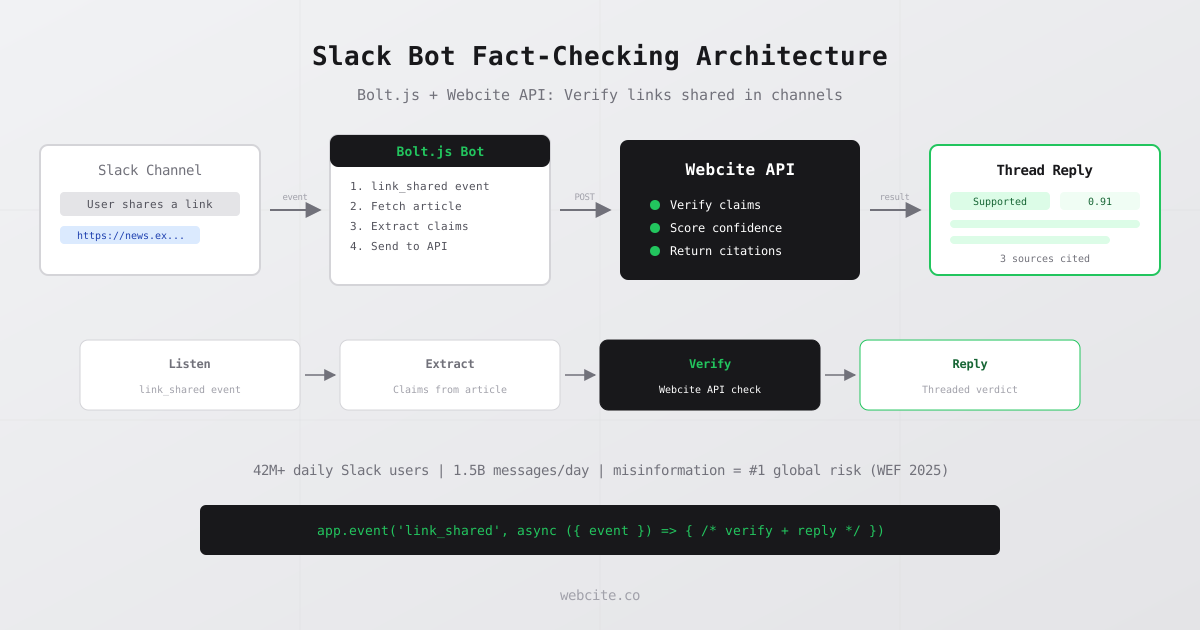
The World Economic Forum ranked misinformation and disinformation as the number one short-term global risk for the second consecutive year in its 2025 Global Risks Report, according to the World Economic Forum, 2025. Slack processes over 1.5 billion messages per day across 42 million daily active users, according to DemandSage, 2025. Every shared link in those messages is a potential vector for false claims reaching your team. This tutorial walks you through building a Slack bot with Bolt.js that intercepts shared links, extracts claims, and verifies them against real sources using the Webcite API.
- Slack bots can listen for shared links using the link_shared event and verify claims automatically.
- The complete fact-checking bot requires fewer than 150 lines of JavaScript with Bolt.js and Node.js.
- Each verification call to the Webcite API takes 1-3 seconds and returns a verdict with citations.
- Threaded replies keep verification results visible without disrupting channel conversations.
- Deployment to serverless platforms like AWS Lambda or Google Cloud Functions takes under 10 minutes.
Why Slack Channels Need Automated Fact-Checking
Slack is where teams make decisions. When someone shares a link to a news article, industry report, or competitor analysis, the claims in that link influence strategy, budgets, and product direction. If those claims are wrong, the decisions built on them are wrong too.
The scale of the problem is significant. Disinformation cost corporations an estimated $78 billion per year globally, according to the World Economic Forum, 2025. Deepfake attacks alone cost businesses an average of $450,000 per incident in 2024, according to the Edelman Crisis and Risk Report, 2024. These numbers represent the cost of acting on false information, not just the cost of identifying it.
Manual fact-checking does not scale. Employees already spend an average of 4.3 hours per week verifying AI-generated content, costing approximately $14,200 per employee annually, according to Korra, 2024. A Slack bot that checks links automatically removes that burden for shared articles and lets your team focus on the analysis, not the verification.
A verification API is the engine behind this automation. Instead of building your own source-checking logic, you send a claim and get back a verdict with citations. The bot you will build in this tutorial connects that capability directly to your Slack workspace.
Setting Up Your Slack App with Bolt.js
Bolt.js is the official Slack framework for building apps in JavaScript. It handles OAuth, event subscriptions, and message posting so you can focus on the verification logic. The framework is maintained by the Slack developer team and supports both Socket Mode (for development) and HTTP mode (for production).
Step 1: Create the Slack App
Go to api.slack.com/apps and click “Create New App” then “From Scratch.” Name your app “Link Checker” and select your workspace.
Under OAuth & Permissions, add these bot token scopes:
links:read(to receive link_shared events)links:write(to unfurl links)chat:write(to post threaded replies)
Under Event Subscriptions, enable events and subscribe to the bot event called link_shared. Register the domains you want to monitor. Slack allows up to five domains per app.
Install the app to your workspace. Copy the Bot User OAuth Token and Signing Secret from the app settings.
Step 2: Initialize the Node.js Project
mkdir slack-fact-checker && cd slack-fact-checker
npm init -y
npm install @slack/bolt node-fetch dotenv
Create an environment file (.env) with your credentials:
SLACK_BOT_TOKEN=xoxb-your-bot-token
SLACK_SIGNING_SECRET=your-signing-secret
VERIFY_API_KEY=your-api-key
PORT=3000
Step 3: Create the Bot Entry Point
// index.js
const { App } = require("@slack/bolt")
require("dotenv").config()

const app = new App({
  token: process.env.SLACK_BOT_TOKEN,
  signingSecret: process.env.SLACK_SIGNING_SECRET,
  socketMode: true,
  appToken: process.env.SLACK_APP_TOKEN
})

;(async () => {
  await app.start(process.env.PORT || 3000)
  console.log("Fact-checker bot is running")
})()
This gives you a running Slack bot in under 15 lines. The next sections add the fact-checking logic.
Listening for Shared Links and Extracting Claims
Slack fires the link_shared event whenever a user posts a URL in a channel that matches one of your registered domains. The event payload includes the channel ID, message timestamp, and the list of shared URLs.
Step 4: Handle the link_shared Event
const fetch = require("node-fetch")

app.event("link_shared", async ({ event, client }) => {
  for (const link of event.links) {
    try {
      const article = await fetchArticle(link.url)
      const claims = extractClaims(article)
      const results = await verifyClaims(claims)
      await postVerificationThread(client, event, link.url, results)
    } catch (error) {
      console.error("Verification failed for", link.url, error.message)
    }
  }
})
Step 5: Fetch and Parse the Article
async function fetchArticle(url) {
  const response = await fetch(url, {
    headers: { "User-Agent": "SlackFactChecker/1.0" }
  })
  const html = await response.text()
  // Strip HTML tags, keep text content
  const text = html
    .replace(/<script[\s\S]*?<\/script>/gi, "")
    .replace(/<style[\s\S]*?<\/style>/gi, "")
    .replace(/<[^>]+>/g, " ")
    .replace(/\s+/g, " ")
    .trim()
  return text.slice(0, 5000) // Limit to first 5000 chars
}
Step 6: Extract Factual Claims
Not every sentence in an article is a factual claim worth verifying. Focus on sentences that contain numbers, dates, percentages, or proper nouns, as these are the claims most likely to be wrong and most likely to influence decisions.
function extractClaims(articleText) {
  const sentences = articleText
    .split(/[.!?]+/)
    .map(s => s.trim())
    .filter(s => s.length > 30 && s.length < 300)

  const factualClaims = sentences.filter(s =>
    /\d/.test(s) || /[A-Z][a-z]{2,}/.test(s.slice(1))
  )

  // Return top 3 claims to keep API usage efficient
  return factualClaims.slice(0, 3)
}
Limiting to three claims per article keeps your Webcite credit usage efficient. Each verification uses 4 credits (2 for citation retrieval, 1 for stance detection, 1 for verdict), so three claims use 12 credits per link.
Verifying Claims with the Webcite API
The Webcite API accepts a claim as input and returns a verdict (supported, contradicted, or insufficient evidence), a confidence score, and citations from real sources. This is the core of the bot’s fact-checking capability. For background on how verification APIs differ from search APIs, see our verification API guide.
Step 7: Send Claims to the API
async function verifyClaim(claim) {
  const response = await fetch("https://api.webcite.co/api/v1/verify", {
    method: "POST",
    headers: {
      "x-api-key": process.env.WEBCITE_API_KEY,
      "Content-Type": "application/json"
    },
    body: JSON.stringify({
      claim: claim,
      include_stance: true,
      include_verdict: true
    })
  })
  return response.json()
}

async function verifyClaims(claims) {
  return Promise.all(claims.map(claim =>
    verifyClaim(claim).then(result => ({
      claim,
      verdict: result.verdict?.result || "unknown",
      confidence: result.verdict?.confidence || 0,
      citations: result.citations || []
    }))
  ))
}
Running verifications in parallel with Promise.all means three claims complete in the time of one. Total latency stays under 5 seconds for most articles.
Posting Verification Results as Threaded Replies
The bot posts results in a thread attached to the original message. This keeps the verification visible to anyone reading the conversation without flooding the channel with separate messages.
Step 8: Format and Post the Results
async function postVerificationThread(client, event, url, results) {
  const blocks = [
    {
      type: "section",
      text: {
        type: "mrkdwn",
        text: `*Fact-Check Report* for <${url}|this link>`
      }
    },
    { type: "divider" }
  ]

  for (const r of results) {
    const icon = r.verdict === "supported" ? "white_check_mark"
      : r.verdict === "contradicted" ? "x"
      : "grey_question"

    const sources = r.citations.slice(0, 2)
      .map(c => `<${c.url}|${c.title || "Source"}>`)
      .join(", ")

    blocks.push({
      type: "section",
      text: {
        type: "mrkdwn",
        text: `:${icon}: *${r.verdict}* (${r.confidence}% confidence)\n>${r.claim.slice(0, 200)}\n${sources ? "Sources: " + sources : ""}`
      }
    })
  }

  await client.chat.postMessage({
    channel: event.channel,
    thread_ts: event.message_ts,
    blocks: blocks,
    text: "Fact-check results for shared link"
  })
}
The result is a clean, readable thread that shows each verified claim with its verdict, confidence score, and source citations. Team members can click the source links to read the evidence themselves.
Full Working Code
Here is the complete bot in a single file:
// index.js - Complete Slack Fact-Checking Bot
const { App } = require("@slack/bolt")
const fetch = require("node-fetch")
require("dotenv").config()

const app = new App({
  token: process.env.SLACK_BOT_TOKEN,
  signingSecret: process.env.SLACK_SIGNING_SECRET,
  socketMode: true,
  appToken: process.env.SLACK_APP_TOKEN
})

async function fetchArticle(url) {
  const response = await fetch(url, {
    headers: { "User-Agent": "SlackFactChecker/1.0" },
    timeout: 10000
  })
  const html = await response.text()
  return html
    .replace(/<script[\s\S]*?<\/script>/gi, "")
    .replace(/<style[\s\S]*?<\/style>/gi, "")
    .replace(/<[^>]+>/g, " ")
    .replace(/\s+/g, " ")
    .trim()
    .slice(0, 5000)
}

function extractClaims(text) {
  return text
    .split(/[.!?]+/)
    .map(s => s.trim())
    .filter(s => s.length > 30 && s.length < 300)
    .filter(s => /\d/.test(s) || /[A-Z][a-z]{2,}/.test(s.slice(1)))
    .slice(0, 3)
}

async function verifyClaim(claim) {
  const res = await fetch("https://api.webcite.co/api/v1/verify", {
    method: "POST",
    headers: {
      "x-api-key": process.env.WEBCITE_API_KEY,
      "Content-Type": "application/json"
    },
    body: JSON.stringify({
      claim,
      include_stance: true,
      include_verdict: true
    })
  })
  const data = await res.json()
  return {
    claim,
    verdict: data.verdict?.result || "unknown",
    confidence: data.verdict?.confidence || 0,
    citations: data.citations || []
  }
}

app.event("link_shared", async ({ event, client }) => {
  for (const link of event.links) {
    try {
      const article = await fetchArticle(link.url)
      const claims = extractClaims(article)
      if (claims.length === 0) continue

      const results = await Promise.all(claims.map(verifyClaim))

      const blocks = [
        {
          type: "section",
          text: {
            type: "mrkdwn",
            text: `*Fact-Check Report* for <${link.url}|this link>`
          }
        },
        { type: "divider" }
      ]

      for (const r of results) {
        const icon = r.verdict === "supported"
          ? "white_check_mark"
          : r.verdict === "contradicted"
            ? "x"
            : "grey_question"

        const sources = r.citations
          .slice(0, 2)
          .map(c => `<${c.url}|${c.title || "Source"}>`)
          .join(", ")

        blocks.push({
          type: "section",
          text: {
            type: "mrkdwn",
            text: `:${icon}: *${r.verdict}* (${r.confidence}% confidence)\n>${r.claim.slice(0, 200)}\n${sources ? "Sources: " + sources : ""}`
          }
        })
      }

      await client.chat.postMessage({
        channel: event.channel,
        thread_ts: event.message_ts,
        blocks,
        text: "Fact-check results for shared link"
      })
    } catch (err) {
      console.error("Verification error:", err.message)
    }
  }
})

;(async () => {
  await app.start(process.env.PORT || 3000)
  console.log("Fact-checker bot is running")
})()
The entire bot fits in under 120 lines of JavaScript.
Deploying to a Serverless Platform
For production, you want the bot running 24/7 without managing a server. Slack Connect usage surged by 35 percent in 2025, enabling over 100 million inter-company messages per week, according to SQ Magazine, 2025. That cross-organization traffic makes link verification even more important since external links are harder to trust. Three platforms work well with Slack bots.
AWS Lambda with API Gateway is the most common choice for Slack bots. Switch from Socket Mode to HTTP mode, set the request URL in your Slack app configuration to your Lambda endpoint, and deploy with the Serverless Framework or AWS SAM. Lambda’s free tier covers most small to mid-size workspaces.
Google Cloud Functions follows a similar pattern. Deploy the bot as an HTTP function, configure the Slack event subscription URL, and set environment variables in the Cloud Console. Google Cloud offers 2 million free invocations per month, which handles thousands of daily link verifications.
Railway provides the simplest deployment experience. Push your repository to GitHub, connect it to Railway, set your environment variables, and the bot is live. Railway costs $5/month for hobby projects with always-on execution.
For HTTP mode deployment, replace the Socket Mode configuration:
const app = new App({
  token: process.env.SLACK_BOT_TOKEN,
  signingSecret: process.env.SLACK_SIGNING_SECRET
})
Then export the receiver for your serverless platform:
// For AWS Lambda
const { AwsLambdaReceiver } = require("@slack/bolt")

const receiver = new AwsLambdaReceiver({
  signingSecret: process.env.SLACK_SIGNING_SECRET
})

const app = new App({
  token: process.env.SLACK_BOT_TOKEN,
  receiver
})

module.exports.handler = async (event, context, callback) => {
  const handler = await receiver.start()
  return handler(event, context, callback)
}
Cost Analysis and Credit Management
Understanding credit usage helps you choose the right Webcite plan for your team’s link-sharing volume.
Each verification call uses 4 credits: 2 for citation retrieval, 1 for stance detection, and 1 for the verdict. The bot verifies 3 claims per link, so each shared link costs 12 credits.
Webcite offers three pricing tiers. The free tier includes 50 credits per month, enough for 4 link verifications. This is sufficient for testing and personal workspaces. The Builder plan at $20/month provides 500 credits, covering approximately 41 link verifications per month. For teams that share 1-2 links per business day, this plan fits. Enterprise plans start at 10,000+ credits for high-volume workspaces.
Compare that to the cost of not checking. Eight in 10 executives are concerned about reputational damage from AI-driven disinformation, according to the Edelman Crisis and Risk Report, 2024. Stock market losses from false information amount to $39 billion annually, according to the World Economic Forum, 2025. A $20/month bot that catches even one false claim before it influences a business decision pays for itself.
You can optimize credit usage further by only verifying links from specific channels (like #strategy or #research), skipping known-safe domains, or caching verification results for URLs that have already been checked.
Extending the Bot
Over 23 percent of surveyed Americans admitted to sharing a fake news story, whether knowingly or not, according to Redline Digital, 2024. Inside a Slack workspace, one false link can cascade through replies, threads, and forwarded channels. Once the core verification loop works, three extensions add meaningful value.
Selective verification by channel. Not every channel needs fact-checking. Configure the bot to only process links in decision-critical channels like #strategy, #research, or #competitive-intel. Add a channel allowlist to the event handler:
const VERIFY_CHANNELS = ["C01STRATEGY", "C02RESEARCH"]

app.event("link_shared", async ({ event, client }) => {
  if (!VERIFY_CHANNELS.includes(event.channel)) return
  // ... rest of handler
})
Verification caching. If the same article is shared in multiple channels, cache the results to avoid duplicate API calls. A simple in-memory Map with a 24-hour TTL works for most workspaces.
Weekly digest. Track all verifications and post a weekly summary to a designated channel showing how many links were checked, how many claims were contradicted, and which sources appeared most often. This gives leadership visibility into information quality across the workspace.
For a deeper look at how verification APIs add fact-checking to chatbots and other AI tools, see our integration tutorial.
Frequently Asked Questions
How do I build a Slack bot that checks links for misinformation?
Create a Slack app with Bolt.js, subscribe to the link_shared event, fetch the article content from each shared URL, extract factual claims, and send those claims to a verification API like Webcite. Post the verification results as a threaded reply in the original channel. The complete implementation requires fewer than 150 lines of JavaScript.
What is the Slack link_shared event?
The link_shared event fires whenever a user posts a URL in a Slack channel that matches a domain your app is registered to track. Your bot receives the event payload containing the channel ID, message timestamp, and the list of shared URLs, which you can then process for verification. Slack allows each app to register up to five monitored domains.
How much does it cost to run a Slack fact-checking bot?
Slack charges nothing for bot usage under 10 workspaces. Webcite offers 50 free credits per month, enough for 4 full link verifications at 12 credits each. The Builder plan at $20/month provides 500 credits for approximately 41 link verifications. Most teams stay within the Builder plan unless they verify hundreds of links daily.
Can a Slack bot verify links in real time?
Yes. The Webcite API returns verification results in 1 to 3 seconds per claim. By verifying the top 3 claims from each article in parallel using Promise.all, total latency stays under 5 seconds. The bot posts results as a threaded reply so it does not interrupt the channel conversation.
What tools do I need to build a Slack verification bot?
You need Node.js 18 or higher, the Slack Bolt.js framework, a Slack app with bot token and signing secret, and a Webcite API key. The complete bot requires fewer than 150 lines of JavaScript and can be deployed to any serverless platform like AWS Lambda, Google Cloud Functions, or Railway.