Gartner predicts that 40% of enterprise applications will include task-specific AI agents by 2026, up from under 5% in 2025, according to Gartner, 2025. Agents chain multiple LLM calls, tool invocations, and reasoning steps into a single workflow. That chaining multiplies the probability of error at every step. This article covers why agent output needs verification, the testing patterns that work, and how to wire a verification API into your agent pipeline with working code.
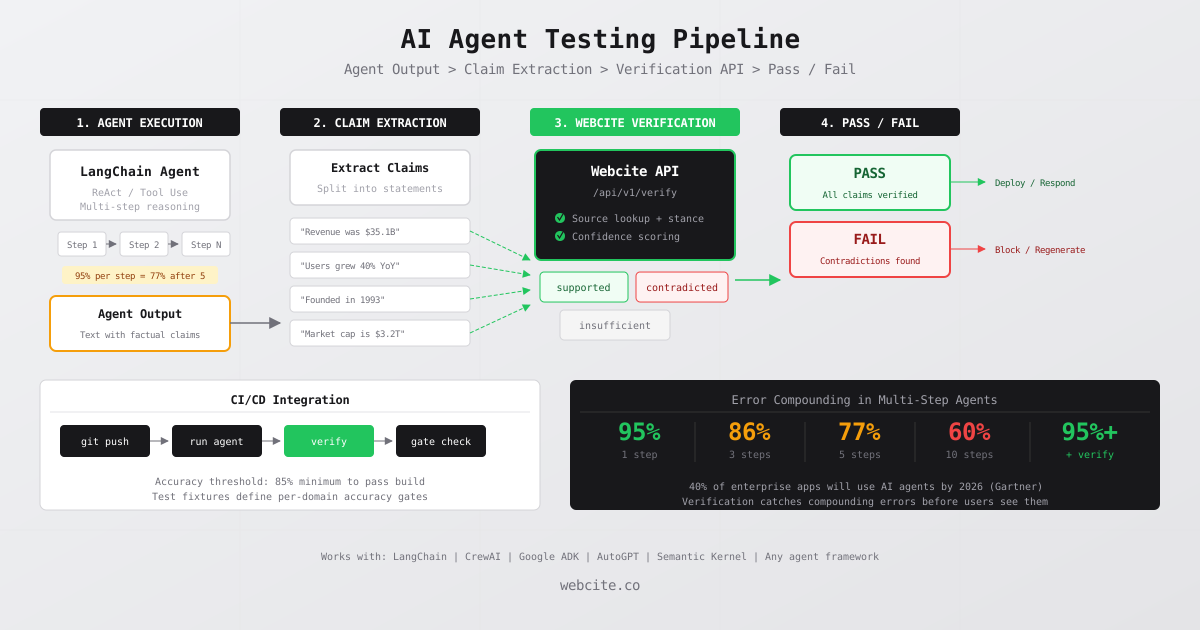
- AI agents compound errors across chained steps: 95% per-step accuracy drops to 77% after 5 steps.
- Agent testing requires claim extraction followed by independent verification against external sources.
- Webcite's verification API checks each extracted claim and returns a verdict with cited evidence.
- Batch testing agent logs catches regressions across hundreds of past responses in minutes.
- CI/CD integration lets you fail builds when agent accuracy drops below a defined threshold.
Why Agent Output Needs Verification
A standalone LLM call has a single point of failure: the model generates something wrong. An AI agent built on frameworks like LangChain, CrewAI, Google ADK, or AutoGPT has multiple points of failure chained together. The agent decides which tool to call, interprets the tool’s output, reasons about the next step, and synthesizes a final answer. Each step introduces error probability.
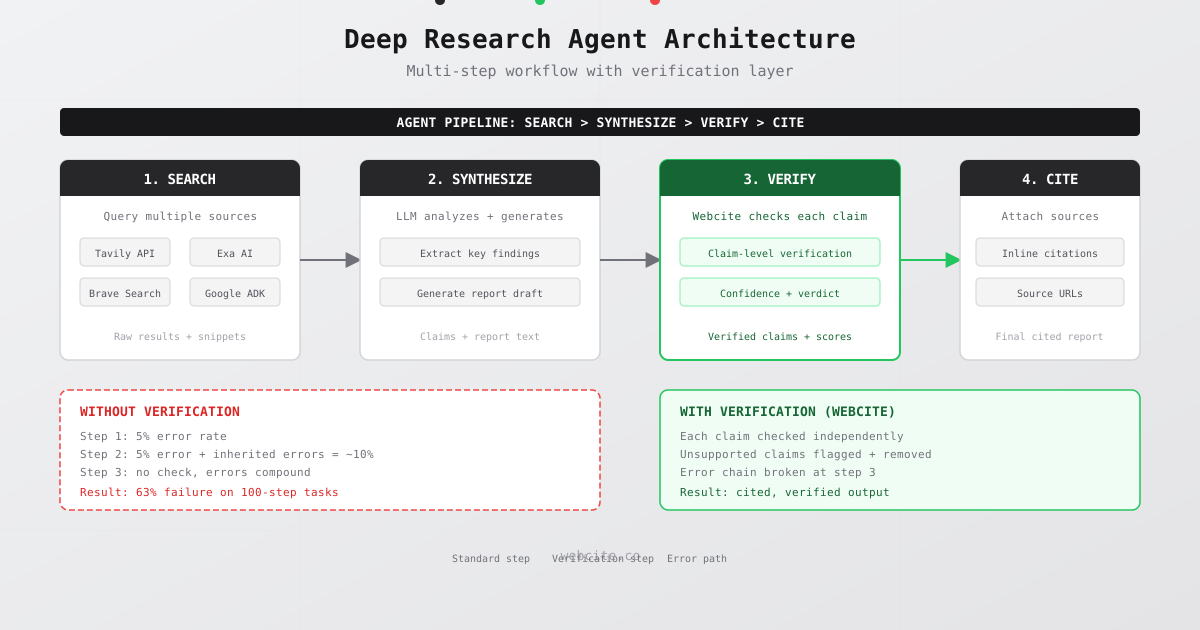
The math is straightforward. A model with 90% accuracy per step produces a four-step agent with only 65% overall accuracy (0.9 raised to the power of 4), according to Wand.ai, 2025. At 95% per step, a five-step chain drops to 77% accuracy. At 99% per step, five steps still yield only 95% end-to-end accuracy. These are not hypothetical numbers. They are the mathematical reality of sequential probabilistic systems.
The compounding effect is worse than it looks because errors are not independent. A mistake in step two becomes the input for step three. The agent builds on faulty assumptions, and by the time a human reviews the final output, the error has propagated through multiple layers of reasoning, according to Towards Data Science, 2025.
OpenAI’s o4-mini reasoning model demonstrates this directly: its hallucination rate reaches 48% on factual benchmarks, according to Techopedia, 2025. Reasoning models that break problems into multiple internal steps face the same compounding problem. More steps means more opportunities for fabrication.
This makes agent testing fundamentally different from testing a simple LLM wrapper. You cannot just check whether the output “looks right.” You need to verify that every factual claim in the agent’s final response is actually true.
Agent Testing Patterns That Work
Testing AI agents requires different patterns than testing traditional software. The output is nondeterministic, the reasoning path varies between runs, and the “correct” answer is often a range of acceptable responses rather than a single expected value. LangChain’s State of AI Agents report found that 52.4% of organizations run offline evaluations on test sets, according to LangChain, 2025. But evaluations alone do not catch factual errors. You need verification.
Three patterns cover the majority of agent testing needs.
Pattern 1: Output claim verification. Extract every factual claim from the agent’s final response and verify each one independently. This is the most direct approach. The agent says “Tesla reported $25.7 billion in Q3 2024 revenue.” You send that claim to a verification API and get back a verdict: supported, contradicted, or insufficient evidence. If even one claim comes back contradicted, you flag the entire response.
Pattern 2: Tool use validation. Check that the agent called the right tools with the right parameters. If your agent is supposed to query a database before answering, verify that it actually did. If it is supposed to search the web for current data, confirm the search happened. LangChain and LangSmith provide trajectory logging that makes this possible. You compare the agent’s actual tool calls against an expected trajectory using functions like create_trajectory_match_evaluator.
Pattern 3: Reasoning chain checks. Examine the intermediate steps, not just the final output. An agent might arrive at the correct final answer through incorrect reasoning. Or it might produce a wrong answer despite correct intermediate steps. Logging the full chain of thought lets you pinpoint where errors enter. Google ADK and LangGraph both expose intermediate state for this purpose.
Output claim verification is the pattern that catches the most production issues because it directly tests what the user sees. The other two patterns are complementary: they help you debug why an agent failed, but claim verification tells you whether it failed at all.
Architecture: Agent to Verified Output
The verification pipeline sits between the agent’s output and the user. The architecture has four stages.
Stage 1: Agent generates output. Your agent, whether it is built on LangChain, CrewAI, Microsoft Semantic Kernel, or any other framework, produces a text response. This response contains zero or more factual claims mixed with reasoning, opinions, and qualifiers.
Stage 2: Claim extraction. A lightweight function splits the agent’s response into individual verifiable claims. Not every sentence needs verification. Opinions (“I recommend using TypeScript”) and qualifiers (“this may vary by region”) are not verifiable. Factual assertions (“TypeScript adoption reached 78% among frontend developers in 2025”) are. You can use an LLM call or a rule-based extractor for this step.
Stage 3: Verification. Each extracted claim goes to the Webcite verification API. The API searches for evidence, evaluates source credibility, and returns a verdict. Supported claims pass. Contradicted claims fail. Claims with insufficient evidence get flagged for manual review.
Stage 4: Decision. Based on the verification results, you decide what to show the user. Options include: show the response with citation badges on verified claims, block responses that contain contradicted claims, or regenerate the response with instructions to avoid the specific errors found.
Here is the full pipeline in code:
// agent-verification-pipeline.js

async function verifyAgentOutput(agentResponse) {
  // Stage 2: Extract verifiable claims
  const claims = extractClaims(agentResponse)

  // Stage 3: Verify each claim with Webcite
  const results = await Promise.all(
    claims.map(claim => verifyClaim(claim))
  )

  // Stage 4: Decide based on results
  const contradicted = results.filter(r => r.verdict === "contradicted")
  const supported = results.filter(r => r.verdict === "supported")

  return {
    original: agentResponse,
    totalClaims: claims.length,
    supported: supported.length,
    contradicted: contradicted.length,
    accuracyScore: supported.length / claims.length,
    details: results
  }
}

function extractClaims(text) {
  // Split on sentence boundaries and filter for verifiable claims
  const sentences = text.match(/[^.!?]+[.!?]+/g) || []
  return sentences.filter(s => {
    // Keep sentences with numbers, dates, names, or specific assertions
    return /\d|percent|million|billion|according|study|report|found/i.test(s)
  }).map(s => s.trim())
}

async function verifyClaim(claim) {
  const response = await fetch("https://api.webcite.co/api/v1/verify", {
    method: "POST",
    headers: {
      "x-api-key": process.env.WEBCITE_API_KEY,
      "Content-Type": "application/json"
    },
    body: JSON.stringify({
      claim: claim,
      include_stance: true,
      include_verdict: true
    })
  })

  const result = await response.json()
  return {
    claim,
    verdict: result.verdict.result,
    confidence: result.verdict.confidence,
    sources: result.citations
  }
}
This pipeline works with any agent framework. The agent produces text; the pipeline verifies it. No changes to your agent logic required.
Testing a LangChain Agent with Webcite
LangChain is the most widely adopted agent framework, with over 105,000 GitHub stars. Here is a concrete example of testing a LangChain ReAct agent’s output. The agent uses web search and a calculator tool to answer questions about company financials.
// test-langchain-agent.js
import { ChatOpenAI } from "@langchain/openai"
import { AgentExecutor, createReactAgent } from "langchain/agents"
import { TavilySearchResults } from "@langchain/community/tools/tavily_search"
import { Calculator } from "@langchain/community/tools/calculator"

// Define the agent
const llm = new ChatOpenAI({ model: "gpt-4o", temperature: 0 })
const tools = [new TavilySearchResults(), new Calculator()]

// Test cases: questions with minimum accuracy thresholds
const testCases = [
  {
    query: "What was NVIDIA's revenue in fiscal Q3 2025?",
    minAccuracy: 0.8,
    requiredEntities: ["NVIDIA"]
  },
  {
    query: "How many active users does ChatGPT have as of 2025?",
    minAccuracy: 0.8,
    requiredEntities: ["ChatGPT", "OpenAI"]
  },
  {
    query: "What is the current market cap of Microsoft?",
    minAccuracy: 0.7,
    requiredEntities: ["Microsoft"]
  }
]

async function runAgentTest(testCase) {
  // Step 1: Run the agent
  const agent = await createReactAgent({ llm, tools })
  const executor = new AgentExecutor({ agent, tools })
  const result = await executor.invoke({ input: testCase.query })

  // Step 2: Verify the output
  const verification = await verifyAgentOutput(result.output)

  // Step 3: Assert accuracy threshold
  const passed = verification.accuracyScore >= testCase.minAccuracy

  return {
    query: testCase.query,
    agentOutput: result.output,
    accuracyScore: verification.accuracyScore,
    threshold: testCase.minAccuracy,
    passed,
    contradictions: verification.details
      .filter(d => d.verdict === "contradicted")
      .map(d => d.claim)
  }
}

// Run all tests
async function runTestSuite() {
  const results = []
  for (const testCase of testCases) {
    const result = await runAgentTest(testCase)
    results.push(result)
    console.log(
      `${result.passed ? "PASS" : "FAIL"}: ${result.query}`
    )
    console.log(
      `  Accuracy: ${(result.accuracyScore * 100).toFixed(1)}%`
    )
    if (result.contradictions.length > 0) {
      console.log(
        `  Contradictions: ${result.contradictions.join("; ")}`
      )
    }
  }

  const passRate = results.filter(r => r.passed).length / results.length
  console.log(`\nSuite pass rate: ${(passRate * 100).toFixed(1)}%`)

  if (passRate < 1.0) {
    process.exit(1) // Fail CI if any test fails
  }
}

runTestSuite()
The key insight is that you are not testing whether the agent produces the exact same output every time. You are testing whether the output is factually correct. The agent might phrase its answer differently on each run, but the claims it makes should be verifiable every time.
Batch Testing Agent Responses from Logs
Production agents generate thousands of responses per day. Testing them one at a time during development is not enough. You need to batch-test historical responses to catch patterns of failure that single tests miss.
KPMG’s AI Quarterly Pulse Survey found that agent deployment surged from 11% of organizations in Q1 2026 to over 26% by Q4, according to KPMG, 2026. As adoption scales, so does the volume of agent output that needs verification.
Here is a batch testing script that reads agent responses from a log file and verifies them in parallel:
// batch-verify-agent-logs.js
import { readFileSync } from "fs"

const BATCH_SIZE = 10 // Parallel verification limit
const WEBCITE_API = "https://api.webcite.co/api/v1/verify"

async function batchVerify(logFile) {
  const logs = JSON.parse(readFileSync(logFile, "utf-8"))
  const results = []

  // Process in batches to respect rate limits
  for (let i = 0; i < logs.length; i += BATCH_SIZE) {
    const batch = logs.slice(i, i + BATCH_SIZE)
    const batchResults = await Promise.all(
      batch.map(async (entry) => {
        const claims = extractClaims(entry.agentOutput)
        const verifications = await Promise.all(
          claims.map(claim => verifySingleClaim(claim))
        )

        const supported = verifications.filter(
          v => v.verdict === "supported"
        ).length
        const total = verifications.length

        return {
          id: entry.id,
          query: entry.query,
          claimCount: total,
          supportedCount: supported,
          accuracy: total > 0 ? supported / total : 1,
          failures: verifications
            .filter(v => v.verdict === "contradicted")
            .map(v => ({
              claim: v.claim,
              confidence: v.confidence
            }))
        }
      })
    )
    results.push(...batchResults)
  }

  // Aggregate statistics
  const totalResponses = results.length
  const avgAccuracy = results.reduce(
    (sum, r) => sum + r.accuracy, 0
  ) / totalResponses
  const failedResponses = results.filter(r => r.accuracy < 0.8)

  return {
    totalResponses,
    averageAccuracy: avgAccuracy,
    failedCount: failedResponses.length,
    failureRate: failedResponses.length / totalResponses,
    worstResponses: results
      .sort((a, b) => a.accuracy - b.accuracy)
      .slice(0, 5),
    allResults: results
  }
}

async function verifySingleClaim(claim) {
  const response = await fetch(WEBCITE_API, {
    method: "POST",
    headers: {
      "x-api-key": process.env.WEBCITE_API_KEY,
      "Content-Type": "application/json"
    },
    body: JSON.stringify({
      claim,
      include_stance: true,
      include_verdict: true
    })
  })
  const data = await response.json()
  return {
    claim,
    verdict: data.verdict.result,
    confidence: data.verdict.confidence
  }
}

// Example log format:
// [{ id: "resp-001", query: "...", agentOutput: "..." }, ...]
const report = await batchVerify("./agent-logs.json")
console.log(`Verified ${report.totalResponses} responses`)
console.log(`Average accuracy: ${(report.averageAccuracy * 100).toFixed(1)}%`)
console.log(`Failed responses: ${report.failedCount}`)
Batch testing reveals failure patterns that individual tests cannot surface. You might discover that your agent consistently fabricates statistics about a specific topic, or that accuracy drops when queries involve dates older than six months. These patterns inform prompt improvements and retrieval adjustments.
CI/CD Integration for Agent Testing
Agent accuracy should be a gated check in your deployment pipeline, the same way type checking and unit tests are. If the agent’s factual accuracy drops below a threshold, the build should fail.
CircleCI’s research on CI/CD strategies for generative AI applications recommends treating AI evaluation as a first-class pipeline stage, according to CircleCI, 2025. Here is how to integrate agent verification into a GitHub Actions workflow:
name: Agent Accuracy Check
on:
  pull_request:
    paths:
      - "agents/**"
      - "prompts/**"
      - "tools/**"

jobs:
  verify-agent-output:
    runs-on: ubuntu-latest
    steps:
      - uses: actions/checkout@v4

      - name: Setup Node
        uses: actions/setup-node@v4
        with:
          node-version: "22"

      - name: Install dependencies
        run: npm ci

      - name: Run agent test suite
        env:
          VERIFY_API_KEY: $
          OPENAI_API_KEY: $
        run: node tests/agent-accuracy.test.js

      - name: Upload verification report
        if: always()
        uses: actions/upload-artifact@v4
        with:
          name: agent-verification-report
          path: ./test-results/verification-report.json
The test script (agent-accuracy.test.js) follows this structure:
// tests/agent-accuracy.test.js
import { readFileSync } from "fs"
import { writeFileSync, mkdirSync } from "fs"

const FIXTURES_DIR = "./tests/fixtures"
const RESULTS_DIR = "./test-results"
const MIN_ACCURACY = 0.85 // 85% minimum accuracy gate

async function main() {
  mkdirSync(RESULTS_DIR, { recursive: true })

  // Load test fixtures
  const fixtures = JSON.parse(
    readFileSync(`${FIXTURES_DIR}/agent-test-cases.json`, "utf-8")
  )

  const results = []
  let failures = 0

  for (const fixture of fixtures) {
    // Run agent and verify
    const agentOutput = await runAgent(fixture.query)
    const verification = await verifyAgentOutput(agentOutput)

    const passed = verification.accuracyScore >= MIN_ACCURACY
    if (!passed) failures++

    results.push({
      fixture: fixture.id,
      query: fixture.query,
      accuracy: verification.accuracyScore,
      threshold: MIN_ACCURACY,
      passed,
      details: verification.details
    })
  }

  // Write report
  writeFileSync(
    `${RESULTS_DIR}/verification-report.json`,
    JSON.stringify(results, null, 2)
  )

  // Print summary
  const passRate = (results.length - failures) / results.length
  console.log(`\nAgent Accuracy Report`)
  console.log(`Total tests: ${results.length}`)
  console.log(`Passed: ${results.length - failures}`)
  console.log(`Failed: ${failures}`)
  console.log(`Pass rate: ${(passRate * 100).toFixed(1)}%`)

  if (failures > 0) {
    console.error(`\nFAILED: ${failures} test(s) below ${MIN_ACCURACY * 100}% accuracy threshold`)
    process.exit(1)
  }
}

main()
The test fixtures file defines repeatable scenarios:
[
  {
    "id": "finance-001",
    "query": "What was Apple's revenue in Q4 2024?",
    "category": "financial",
    "minAccuracy": 0.9
  },
  {
    "id": "science-001",
    "query": "What is the current global average temperature increase?",
    "category": "scientific",
    "minAccuracy": 0.85
  },
  {
    "id": "tech-001",
    "query": "How many parameters does GPT-4 have?",
    "category": "technical",
    "minAccuracy": 0.8
  }
]
This setup catches regressions early. When a developer changes a prompt template or swaps a tool, the CI pipeline verifies that agent accuracy has not degraded before the change reaches production.
Choosing Accuracy Thresholds by Domain
Not all agent applications need the same accuracy bar. A creative writing assistant and a medical information agent have fundamentally different risk profiles.
Retrieval-augmented generation cuts hallucinations by 71% compared to vanilla LLM calls, according to AllAboutAI, 2026. But even with RAG, Stanford researchers found that legal AI tools from LexisNexis and Thomson Reuters hallucinate in 17 to 33 percent of queries, according to Magesh et al., Stanford Law School, 2024. Your threshold should reflect the cost of an error in your specific domain.
Here is a practical framework:
| Domain | Suggested Threshold | Rationale |
|---|---|---|
| Healthcare / Legal | 95%+ | Errors cause direct harm or liability |
| Financial / Compliance | 90%+ | Regulatory risk and monetary impact |
| Enterprise Knowledge | 85%+ | Internal productivity at stake |
| Customer Support | 80%+ | Brand reputation risk |
| Content Generation | 75%+ | Lower stakes, human review expected |
Set these thresholds in your CI configuration and adjust based on production data. If your agent consistently hits 92% in a domain where you set 85%, tighten the threshold. If it hovers around 83% in a domain where you set 85%, investigate root causes before loosening the gate.
For a deeper look at how RAG hallucination detection works and where RAG alone falls short, see our dedicated guide. A verification API complements RAG by providing an independent check against external sources rather than relying solely on retrieved context.
Handling Verification Results in Production
Verification results need to drive action, not just generate reports. Here are three production-ready patterns for acting on verification output.
Pattern A: Block and regenerate. If any claim is contradicted, do not show the response. Instead, feed the contradicted claims back to the agent with instructions to correct the errors and regenerate. This pattern works for high-stakes domains where accuracy trumps latency.
async function verifyAndRegenerate(agent, query, maxRetries = 2) {
  for (let attempt = 0; attempt <= maxRetries; attempt++) {
    const output = await agent.invoke({ input: query })
    const verification = await verifyAgentOutput(output.output)

    if (verification.contradicted === 0) {
      return {
        response: output.output,
        citations: verification.details
          .filter(d => d.verdict === "supported")
          .flatMap(d => d.sources),
        attempts: attempt + 1
      }
    }

    // Append correction context for retry
    const corrections = verification.details
      .filter(d => d.verdict === "contradicted")
      .map(d => `Incorrect claim: "${d.claim}"`)
      .join(". ")

    query = `${query}\n\nPrevious answer contained errors: ${corrections}. Please correct these specific claims.`
  }

  return { response: null, error: "Failed accuracy check after retries" }
}
Pattern B: Annotate and display. Show the response immediately but add visual indicators for verified and unverified claims. Green badges for supported claims, red for contradicted, gray for unverified. This pattern suits applications where transparency matters more than gatekeeping.
Pattern C: Log and alert. Show the response as-is but log verification results for monitoring. Alert the team when accuracy drops below a rolling threshold. This works for internal tools where the user has domain expertise to spot errors. Organizations using AI agents project an average ROI of 171% from agentic deployments, according to OneReach.ai, 2026. Maintaining accuracy is essential to realizing that return.
Webcite API Reference for Agent Testing
Here is the specific API usage pattern optimized for agent testing workflows. Each verification call consumes 4 credits: 2 for citation retrieval, 1 for stance detection, and 1 for the verdict.
// Single claim verification
const response = await fetch("https://api.webcite.co/api/v1/verify", {
  method: "POST",
  headers: {
    "x-api-key": "your-api-key",
    "Content-Type": "application/json"
  },
  body: JSON.stringify({
    claim: "NVIDIA reported $35.1 billion in Q3 FY2025 revenue",
    include_stance: true,
    include_verdict: true
  })
})

const result = await response.json()
// result.verdict.result: "supported" | "contradicted" | "insufficient"
// result.verdict.confidence: 0-100
// result.citations: [{ title, url, snippet, stance }]
Pricing tiers for agent testing:
| Plan | Price | Credits | Verifications | Best For |
|---|---|---|---|---|
| Free | $0/month | 50 | ~12 | Prototyping agent tests |
| Builder | $20/month | 500 | ~125 | Development and staging |
| Enterprise | Custom | 10,000+ | 2,500+ | Production CI/CD pipelines |
For batch verification during CI runs, parallelize requests but respect rate limits. The Builder plan supports enough throughput for a test suite of 20-30 agent scenarios running on every pull request.
Frequently Asked Questions
Why do AI agents hallucinate more than standalone LLMs?
AI agents chain multiple LLM calls together, and each call carries its own error probability. A model with 95% accuracy per step drops to 77% accuracy after five chained steps, according to Wand.ai, 2025. Errors in early steps propagate through the entire reasoning chain, making the final output less reliable than any single call.
How do you test an AI agent’s output for factual accuracy?
Extract individual claims from the agent’s final output, then send each claim to a verification API like Webcite. The API checks each claim against real-world sources and returns a verdict with citations. Claims that come back as contradicted or unsupported are flagged for review or regeneration.
Can agent output verification run in a CI/CD pipeline?
Yes. You can store agent test cases as JSON fixtures with expected accuracy thresholds. A CI step runs the agent against each fixture, verifies the output with a verification API, and fails the build if the accuracy score drops below the threshold. This catches regressions before deployment.
What does it cost to verify AI agent output at scale?
Webcite offers a free tier with 50 credits per month. Each verification uses 4 credits, so the free tier covers about 12 verifications. The Builder plan at $20/month provides 500 credits for 125 verifications. Enterprise plans start at 10,000+ credits for high-volume agent testing.
How is agent output verification different from unit testing?
Unit tests check deterministic code paths with exact expected outputs. Agent output verification checks unpredictable LLM-generated text against real-world facts. You cannot assert that an agent will produce the exact same string twice, but you can assert that every factual claim in its output is supported by credible sources.