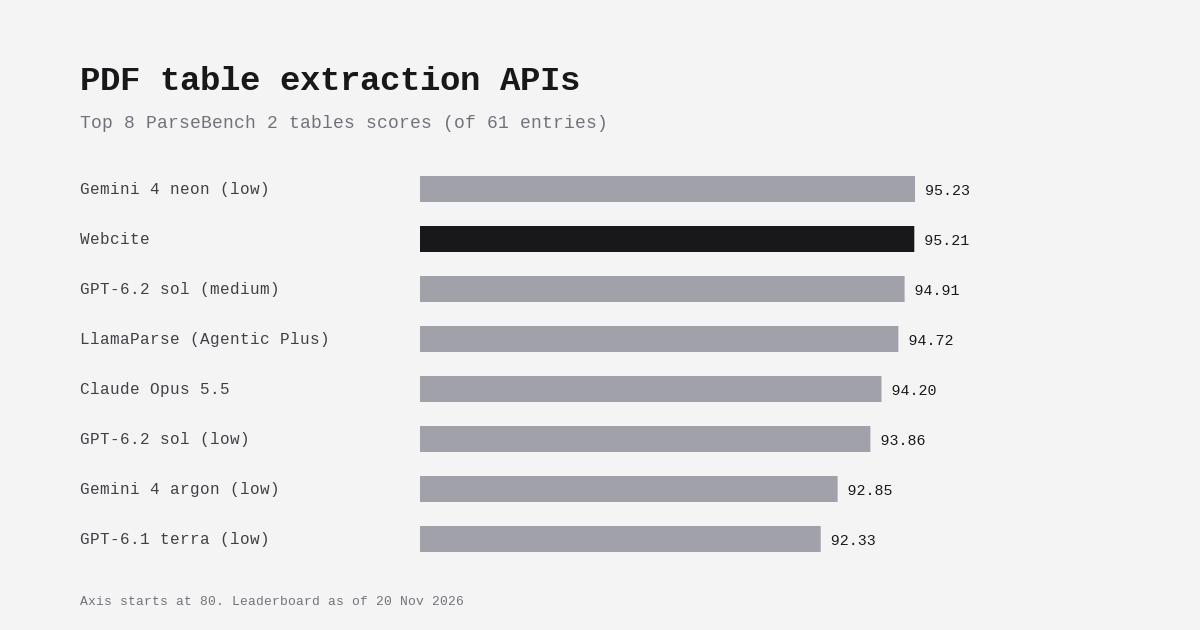
Gemini 4 neon (low) and Webcite have the two highest table scores on ParseBench 2, 95.23 and 95.21, according to the ParseBench 2 leaderboard as of 20 November 2026. The gap is smaller than the half point scores move between runs. This guide ranks table extraction APIs on that score, cost per page and output format, then shows how to extract and check a table.
- Gemini 4 neon (low) leads ParseBench 2 tables at 95.23, with Webcite at 95.21 and GPT-6.2 sol (medium) at 94.91.
- Webcite has the highest table score among document parsers and costs 3.11 US cents a page against 6.204 cents for Gemini 4 neon (low).
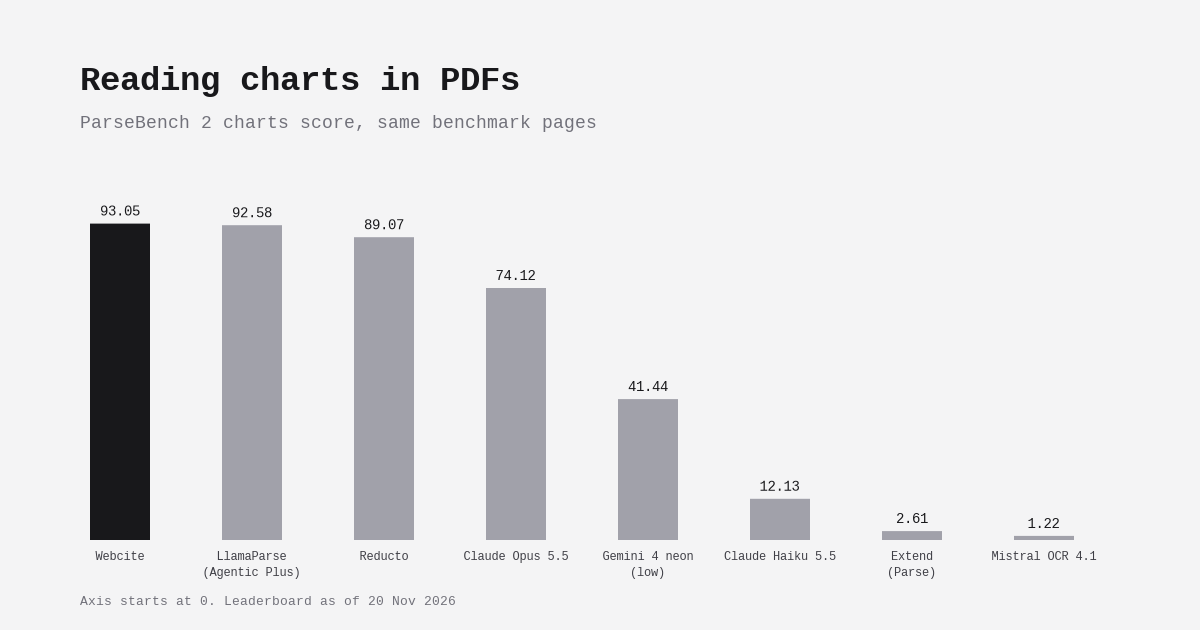
- Vision models read tables well but vary on charts: Gemini 4 neon (low) scored 41.44 on charts.
- Tabula does not read scanned PDFs, so scanned tables need an API or an OCR step.
- Extracted tables still need a numbers check: recompute totals before the figures reach a report.
Which API extracts tables from PDFs most accurately?
Gemini 4 neon (low) has the top ParseBench 2 table score at 95.23, and Webcite is second at 95.21. Six of the top eight are vision models, according to the ParseBench 2 leaderboard CSV.
| Tables rank (as of 20 Nov 2026) | Tables | Overall | Cost per page (US cents) |
|---|---|---|---|
| 1. Gemini 4 neon (low) | 95.23 | 81.67 | 6.204 |
| 2. Webcite | 95.21 | 91.74 | 3.11 |
| 3. GPT-6.2 sol (medium) | 94.91 | 82.12 | 2.468 |
| 4. LlamaParse (Agentic Plus) | 94.72 | 90.93 | 2.813 |
| 5. Claude Opus 5.5 | 94.20 | 87.11 | 6.492 |
| 6. GPT-6.2 sol (low) | 93.86 | 79.12 | 2.289 |
Webcite’s results are self-measured and move by about half a point per dimension between runs, according to Webcite’s ParseBench 2 results page. You can rerun the benchmark yourself. Treat the top four as a tie on tables and decide on cost, the other dimensions your pages need, and what you do with the table next.
Webcite is ranked first overall on ParseBench 2 at 91.74. Ranking pending approval by LlamaIndex. On tables alone it is second. The full ranking of document parsing APIs covers every dimension.
Why does the overall score matter for a table API?
Pages with tables usually carry charts, footnotes and headings too, and a table API that misreads those still breaks the document. Gemini 4 neon (low) leads tables but scored 41.44 on charts and 81.67 overall, according to the leaderboard CSV.
An annual report page often has a revenue table and a bar chart of the same figures. If the chart comes back empty, the two cannot be cross-checked. Webcite scored 93.05 on charts and LlamaParse (Agentic Plus) 92.58, the two highest chart scores. The guide to extracting chart data from PDFs covers that dimension.
Cost differs by more than double across the top four. Gemini 4 neon (low) is listed at 6.204 cents a page and Webcite at 3.11 cents, according to Webcite’s benchmarks page.
How do the table extraction APIs compare on price and output?
Vendor list prices differ from the leaderboard’s cost column, so check both before you budget. The leaderboard records what each run cost; the vendor page says what you will pay today.
| Tool | ParseBench 2 tables | ParseBench 2 overall | Vendor list price, checked 24 Nov 2026 |
|---|---|---|---|
| Webcite | 95.21 | 91.74 | Metered: about 2.7 cents a table page in standard (Webcite pricing) |
| LlamaParse (Agentic Plus) | 94.72 | 90.93 | 25 credits a page at $1.50 per 1,000 credits |
| Reducto (r-1) | 90.97 | 86.23 | $10 per 1,000 pages |
| Datalab (Accurate) | 90.38 | 82.63 | $7.50 per 1,000 pages with a data sharing discount |
| Mistral OCR 4.1 | 81.84 | 69.26 | $4 per 1,000 pages |
LlamaIndex prices Agentic Plus at 25 credits a page and pay as you go credits at $1.50 per 1,000, which is 3.75 cents a page, according to LlamaIndex pricing. The leaderboard lists 2.813 cents for the same tier.
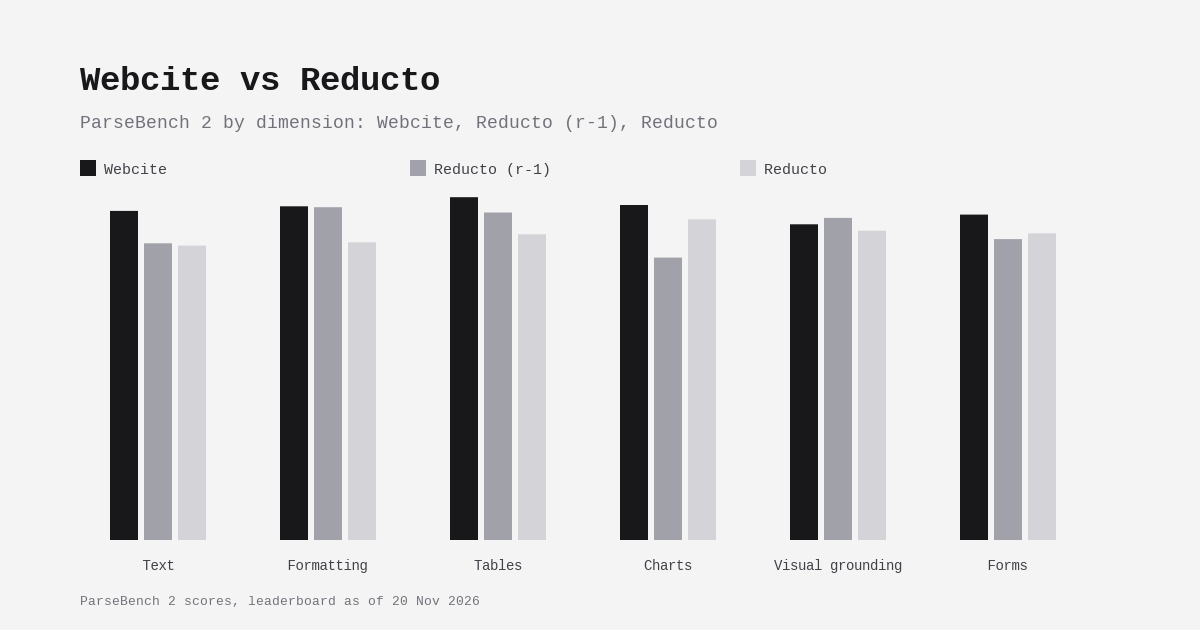
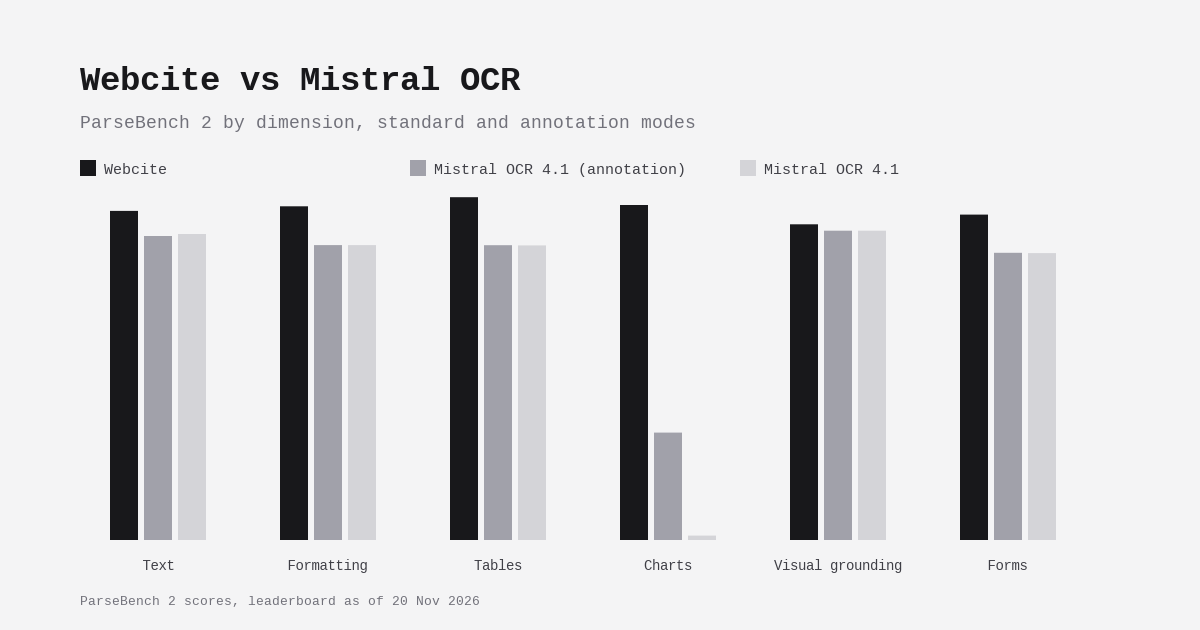
Reducto lists $10 per 1,000 pages for r-1 Parse, according to Reducto pricing. Datalab’s listed prices include a 25% discount for sharing data for model training, according to Datalab pricing. One-to-one pages cover Webcite vs LlamaParse, Webcite vs Reducto and Webcite vs Mistral OCR.
What about open source table extraction?
Open source libraries work well on digital PDFs with a text layer and struggle on scans. The tabula-py FAQ says it does not support PDFs made of page images, according to the tabula-py documentation.
Camelot’s documentation says it only works with text-based PDFs, while its current README describes an optional OCR install for scanned PDFs, according to the Camelot repository. Test the version you install. Docling, under the MIT licence, and MinerU are model-based options you run yourself; MinerU2.5-Pro scored 80.58 on ParseBench 2 tables.
LlamaIndex’s own guide to the best AI for PDF table extraction lists three tools, puts LlamaParse first and cites no benchmark numbers, according to the LlamaIndex guide dated 28 May 2026. LlamaIndex also maintains ParseBench, where LlamaParse (Agentic Plus) is fourth on tables. Our list of LlamaParse alternatives ranked on ParseBench 2 covers the other options.
How do I extract a table from a PDF with an API?
Upload the PDF, extract it, and read the table elements on each page. Each table element carries its Markdown or HTML and a bounding box in page fractions, according to Webcite’s page reading guide.
import os
import requests

API = "https://api.webcite.co/api/v1"
HEADERS = {"x-api-key": os.environ["WEBCITE_API_KEY"]}

with open("annual-report.pdf", "rb") as file:
    upload = requests.post(f"{API}/upload", headers=HEADERS,
                           files={"file": file}, timeout=(10, 300))
upload.raise_for_status()
asset_id = upload.json()["data"]["asset_id"]

result = requests.post(f"{API}/extract", headers=HEADERS,
                       json={"asset_id": asset_id, "mode": "standard"},
                       timeout=(10, 900))
result.raise_for_status()
document = result.json()

if document["state"] != "complete":
    print("not fully read:", document.get("lost"))

for unit in document["units"]:
    page = unit["provenance"].get("page")
    for element in unit.get("elements", []):
        if element["type"] == "table":
            print(f"page {page}, box {element['bbox']}")
            print(element["markdown"])
Standard mode is the higher accuracy read for complex tables with multi-level headers and dense tables. Lite mode still reads long tables again in row bands, and its table score is 90.64, according to Webcite’s extraction guide.
Dense tables cost the most. In standard mode a table page averages 0.68 credits (2.7 cents) and a dense table page 2.15 credits (8.6 cents). The same guide says one reader’s list price doubles on 1 December 2026, raising the average standard page from about 2.95 cents to 5.1 cents.
Where do table extractors still fail?
Very dense tables are the weak spot for every entry. Webcite’s standard run failed on one of 4,317 benchmark documents, dense_tables/dense_table_155, which returned an error on every attempt and scores zero, according to Webcite’s benchmarks page.
Merged header cells are the other common failure. A two-level header such as “FY2025” over “Q1 Q2 Q3 Q4” flattens into one row in plain CSV. Spreadsheets avoid this: Webcite reads workbook cells directly and returns merged ranges, so a header spanning two columns can be rebuilt.
When a table and its source disagree, a parser will not tell you. That needs a separate check on the numbers.
How do I check numbers in an extracted table?
Recompute every total and ratio from the extracted rows and compare it with the printed value. A row read into the wrong column usually shows up as a subtotal that no longer adds up.
Webcite’s conflict analysis recomputes derivable metrics, such as gross margin from revenue and cost of goods sold, and flags where the stated value differs from the computed one. It costs 1 credit per request, according to the compare figures reference. Figures read from a PDF page image are model reads and are capped at needs review, never presented as verified.
For the full workflow, see how to check numbers in AI-generated financial analysis. For per-page prices across more parsers, see the PDF to Markdown API pricing comparison.
Frequently Asked Questions
What is the best API for PDF table extraction in 2026?
On the ParseBench 2 tables dimension as of 20 November 2026, Gemini 4 neon (low) scored 95.23, Webcite 95.21 and GPT-6.2 sol (medium) 94.91. Among document parsers, Webcite has the top table score, and it also leads the overall ranking, pending approval by LlamaIndex.
Can I extract tables from a scanned PDF?
Yes, with an API that reads the page image. Webcite reads every PDF page from its rendered image, so a scanned table is read the same way as a digital one. Open source Tabula does not support scanned PDFs, and Camelot needs its optional OCR install for scans.
How much does PDF table extraction cost per page?
On the ParseBench 2 leaderboard, Webcite cost 3.11 US cents a page, Gemini 4 neon (low) 6.204 cents and Reducto (r-1) 1.00 cent. Webcite’s own price list puts a table page at about 2.7 cents in standard mode and 0.317 cents in lite.
How do I convert a PDF table to JSON or CSV?
Extract the document, take the elements typed as table, and parse each one’s HTML or Markdown table into rows. Keep the page number and bounding box with each table so every row can be traced back to the page.
How do I check numbers extracted from a PDF table?
Recompute totals and ratios from the extracted rows and compare them with the printed values. Webcite’s conflict analysis recomputes derivable metrics and flags mismatches, and source preview shows the cited page beside the figure.