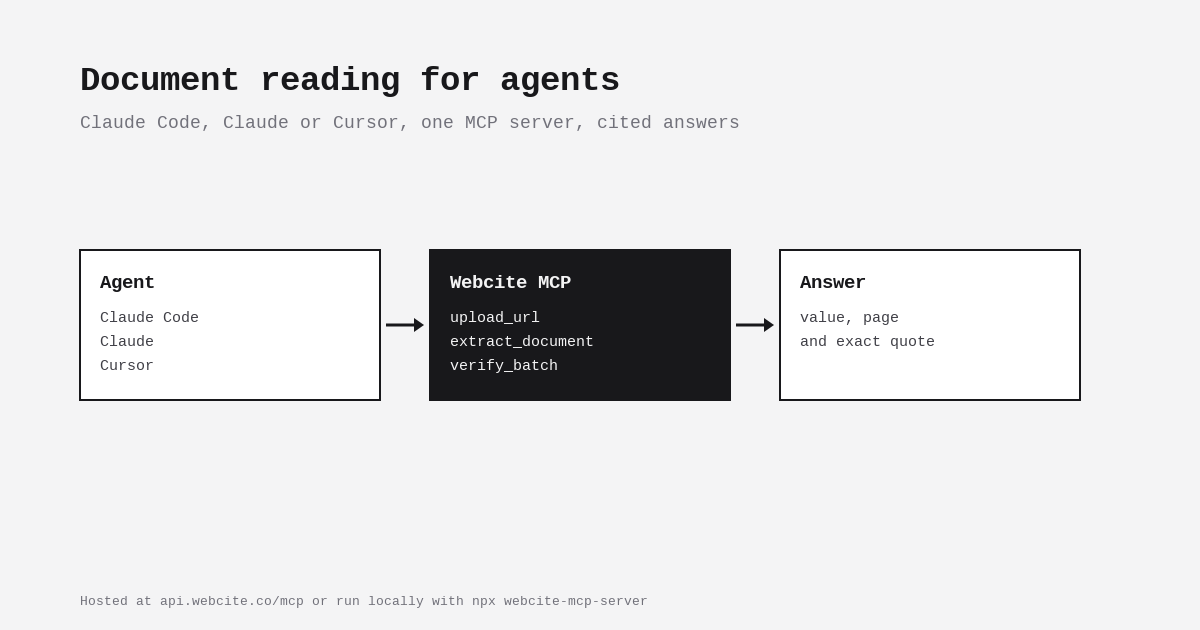
Claude Code, Claude and Cursor can read documents with page-level citations once they connect to a document MCP server, and Webcite’s server exposes 34 tools for extraction, quote checks and full document review, according to Webcite’s live MCP health endpoint, checked 24 November 2026. This guide sets up each client, runs a worked 10-K prompt, and covers the errors you are likely to hit.
- One remote URL, api.webcite.co/mcp, with an Authorization: Bearer header works in Claude Code, Claude and Cursor.
- The local server, started with npx, is the option when the agent needs to read files from your disk.
- The agent extracts the file, finds the figure, and checks the quote against the source before answering.
- Hosted uploads accept base64 files up to 20 MB, or public HTTPS links up to 100 MB.
- The Free plan includes 100 credits a month, and extraction is metered per page at cost.
Why add a document MCP server instead of pasting the PDF?
The agent gets each page as structured text with its page number, element boxes and a quote check, rather than one block of text. Claude’s own PDF support converts each page to an image and extracts its text, using 1,500 to 3,000 tokens a page, according to Anthropic’s PDF support documentation.
That works for one short document in a chat. It is harder to use when you need the exact page behind a number, when the file is a scan inside a codebase, or when an agent must prove a quote exists. Claude’s API caps a request at 600 PDF pages, or 100 when the context window is under one million tokens, according to the same Anthropic page.
Webcite reads each PDF page from its rendered image, checks the reading against the page’s text layer, and returns typed elements with boxes. Its extraction scores on the public ParseBench 2 benchmark, with the method and raw outputs, are on Webcite’s ParseBench 2 results page. For other parsers scored on the same benchmark, see the document parsing APIs ranked on ParseBench 2.
How do I add the Webcite MCP server to Claude Code?
Add the hosted URL with your key in an Authorization header. Claude Code documents remote HTTP servers as the recommended option for remote MCP servers, with headers passed on the command line or in a project file, according to Claude Code’s MCP documentation.
For a server only you use, run claude mcp add with the –transport http flag, the name webcite, the URL api.webcite.co/mcp (with https), and a –header flag set to Bearer plus your key. To share it with a team through the repository, commit the project file .mcp.json instead. Claude Code expands environment variables written as ${VAR}, so the key stays out of git:
{
  "mcpServers": {
    "webcite": {
      "type": "http",
      "url": "https://api.webcite.co/mcp",
      "headers": {
        "Authorization": "Bearer ${WEBCITE_API_KEY}"
      }
    }
  }
}
Claude Code reads a small set of credential variables, such as ANTHROPIC_API_KEY, as empty in remote headers. A name outside that set, such as WEBCITE_API_KEY, expands as written, according to the same documentation. Claude Code asks for approval before it uses a server from a project file. For what to review before adding any third-party server, see the guide to MCP security vulnerabilities and authentication. The /mcp command inside Claude Code shows the connection status and tool count.
For files on your disk, run the server locally with WEBCITE_API_KEY exported. Webcite’s agent guide gives the command: claude mcp add webcite -- npx -y webcite-mcp-server.
How do I add Webcite to Claude as a custom connector?
Add a custom connector with the hosted URL, choose no sign-in, and set the key as a request header. Claude’s Help Center places this under Customize, then Connectors, then Add custom connector, according to Anthropic’s custom connector guide.
- Sign in on the Webcite connectors page and create an API key.
- In Claude, add a custom connector with the URL api.webcite.co/mcp, starting with https.
- Under Authentication, pick No sign in.
- Under Request headers, set Authorization to Bearer followed by your key.
- Ask Claude: “Use webcite_guide, then verify: The Eiffel Tower is 330 meters tall.”
Custom connectors are available on Free, Pro, Max, Ultra, Team and Enterprise plans, and Free users are limited to one, according to the same Help Center article. On Team and Enterprise, an owner adds connectors in organization settings. The connection to the server comes from Anthropic’s servers, not your machine.
For a local server in Claude Desktop, open Settings, then Developer, then Edit Config. The file is claude_desktop_config.json, which on macOS lives in ~/Library/Application Support/Claude/, according to the Model Context Protocol guide to local servers. Add an entry named webcite under mcpServers with the command npx, the arguments -y and the npm package name, and an env entry for WEBCITE_API_KEY.
How do I add Webcite to Cursor?
Add the server to .cursor/mcp.json in a project, or to ~/.cursor/mcp.json for every project. Cursor resolves environment variables written as ${env:NAME} in the url and headers fields, according to Cursor’s MCP documentation.
{
  "mcpServers": {
    "webcite": {
      "url": "https://api.webcite.co/mcp",
      "headers": {
        "Authorization": "Bearer ${env:WEBCITE_API_KEY}"
      }
    }
  }
}
Cursor’s hosted Cloud Agents do not read the global ~/.cursor/mcp.json file, according to the same Cursor page, so put the server in the project file for those. For the local server, replace the url and headers with command, args and env, as in the Claude Desktop example above.
What does the agent do when I ask about a document?
The agent uploads the file, extracts it, reads the figure on its page, and checks the quote before it answers. Try this prompt with a public annual report link:
Read the annual report at example.com/annual-report-2025.pdf. Give me total revenue for the latest fiscal year with the page number and the exact sentence it comes from, and check that the sentence is in the source.
A typical tool sequence on the hosted server, using tool names from Webcite’s MCP tool catalog:
- The webcite_guide tool picks the workflow.
- The upload_url tool stores the PDF and returns an asset ID.
- The extract_document tool returns the pages as Markdown with page numbers, element boxes and a per-page charge.
- The get_source_preview tool returns the cited page’s text and a link to that page.
- The verify_batch tool checks that the quoted sentence appears in the source and reports how it matched: exact, normalized, fuzzy, reflowed or unbound.
A fuzzy or reflowed match is capped at needs review, never verified, so the agent should say so in its answer. To check every claim in a file, ask for a full review instead. The review_document tool starts a job, and the result is complete only when the saved review reports full coverage with no pending claims. For a fuller workflow on financial figures, see checking numbers in AI financial analysis against the source.
What does it cost?
The Free plan includes 100 credits a month, according to Webcite’s live MCP health endpoint; paid plans are on the Webcite pricing page. Extraction is metered per page at cost: about 0.74 credits for a typical standard page, and 0.05 to 0.23 credits in lite mode, according to Webcite’s extraction guide.
A quote check with verify_batch costs 1 credit per item, and a source preview 1 credit. A web claim check with sources, stances and a verdict costs 4 credits. When a request is refused for credits, ask the agent to call get_credit_balance.
How do I fix common setup errors?
Most failures come from the key, the file location or the request limit. Status codes and limits are listed in the errors and rate limits reference, and Webcite support can help with an integration question beyond these.
| Symptom | Likely cause | Fix |
|---|---|---|
| 401 on connect | Header missing Bearer, or key not set | Set Authorization to Bearer plus the key; check the variable is exported |
| Agent cannot open a local path | Hosted server cannot read your disk | Run the local server with npx, or send a public HTTPS link |
| Upload refused | File over 20 MB as base64, or over 100 MB by URL | Use upload_url for large public files, or the HTTP API |
| 429 during extraction | Extraction counts at half your plan’s request limit | Wait for the Retry-After interval; Free allows 25 extractions a minute |
| Tool count differs from 34 | Local profile or package version differs from the hosted one | Compare with the toolCount on mcp-health and the installed package version |
Free accounts get 25 extraction requests a minute and 250 a day by default, according to the extract reference. The server is also listed in the official MCP registry as co.webcite/webcite and on npm as webcite-mcp-server.
For the other tools agents use to search and verify, see MCP search and verification tools for AI agents. For the HTTP version of the quote check, see how to check that a citation supports the claim.
Frequently Asked Questions
How do I make Claude Code read a PDF with page citations?
Add a document MCP server such as Webcite with claude mcp add, then ask Claude Code to extract the PDF and give each figure with its page number and exact quote. The server returns the text page by page with element boxes, so the answer can cite the page.
What is the Webcite MCP server URL?
The hosted endpoint is api.webcite.co/mcp over HTTPS, authenticated with an Authorization: Bearer header carrying your Webcite API key. The local server runs with npx -y webcite-mcp-server and reads WEBCITE_API_KEY from the environment.
Can Cursor read scanned PDFs?
Through an MCP server that reads page images, yes. Webcite reads every PDF page from its rendered image and checks it against the text layer, so scanned pages come back as text with their page numbers. Add it to .cursor/mcp.json or ~/.cursor/mcp.json.
Can the hosted MCP server read a file on my computer?
No. Hosted upload_file takes a filename and base64 content up to 20 MB, and upload_url fetches a public HTTPS file up to 100 MB. To pass local file paths, run the local server with npx.
How many credits does the Webcite MCP server include for free?
The Free plan includes 100 credits a month. Extraction is metered per page at cost, and a quote check with verify_batch costs 1 credit per item.