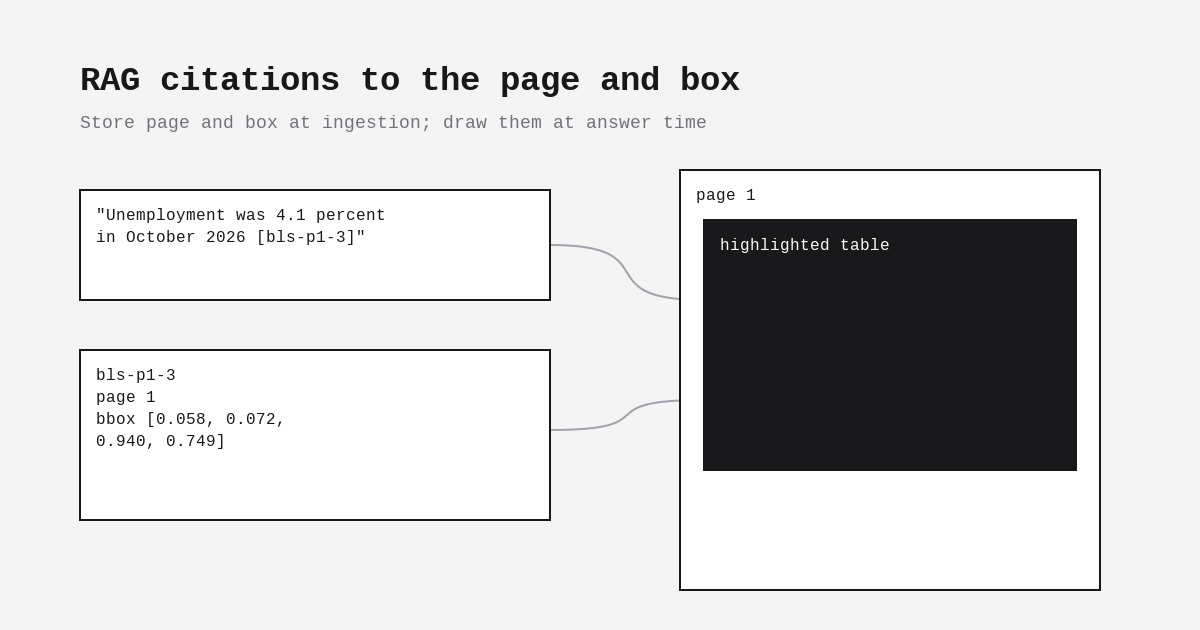
A RAG citation is useful only if it opens the exact place in the source. To build one, store each chunk’s page and bounding box when you ingest the document, have the model cite chunk IDs, check that the quoted words are on that page, and draw the box over the rendered page. Webcite’s extract endpoint returns boxes as fractions of the page, so the highlight works at any zoom.
What should a RAG citation point to?
A RAG citation should point to the passage, not the file. “Source: annual-report.pdf” makes the reader search 80 pages for one number, and many readers will not. A citation that opens page 36 with the table row highlighted gets checked, because checking costs a second.
That needs three things carried from ingestion to the answer: the page, the box around the element and the text the answer relied on. Lose any of them in the pipeline and the citation falls back to the file name. The guide to choosing a PDF parser for RAG explains why the parser decides whether you have them at all.
What do you store at ingestion?
Store one record per element, with its page and box beside the text. This script uploads a public U.S. Bureau of Labor Statistics table by URL, reads it with the documented extract endpoint and builds the records.
import os
import requests

API = "https://api.webcite.co/api/v1"
HEADERS = {"x-api-key": os.environ["WEBCITE_API_KEY"]}
PDF = "https://webcite.co/samples/bls-employment-situation-2026-10-summary-table-a.pdf"

upload = requests.post(f"{API}/upload/url", headers=HEADERS,
                       json={"url": PDF, "filename": "bls-table-a.pdf"}, timeout=60)
upload.raise_for_status()
asset_id = upload.json()["data"]["asset_id"]

document = requests.post(f"{API}/extract", headers=HEADERS,
                         json={"asset_id": asset_id, "mode": "standard"}, timeout=(10, 900))
document.raise_for_status()

records = []
for unit in document.json()["units"]:
    page = unit["provenance"]["page"]
    for n, element in enumerate(unit["elements"]):
        records.append({"id": f"bls-p{page}-{n}", "asset_id": asset_id, "page": page,
                        "bbox": element["bbox"], "type": element["type"], "text": element["markdown"]})

for record in records[:4]:
    print(record["id"], record["type"], [round(v, 3) for v in record["bbox"]])
The saved extract response for this page, recorded on 24 November 2026, gives:
bls-p1-0 page_header [0.063, 0.044, 0.217, 0.055]
bls-p1-1 title [0.062, 0.058, 0.496, 0.071]
bls-p1-2 text [0.07, 0.072, 0.227, 0.084]
bls-p1-3 table [0.058, 0.072, 0.94, 0.749]
Each bbox is [x0, y0, x1, y1] as fractions of the page width and height, with the origin at the top left. Embed the text field and keep the rest as metadata. If page-level citations are enough, the anchored chunks endpoint returns ready-made chunks with their page instead.
How do you cite at answer time?
Give the model chunk IDs and ask it to cite them inline. Put each retrieved chunk in the prompt as [bls-p1-3] <text> and instruct the model to end every factual sentence with the ID it used. Then map the IDs back to records after generation, never trusting the model to produce a page or a box itself.
import re

answer = "The unemployment rate was 4.1 percent in October 2026 [bls-p1-3]."
by_id = {record["id"]: record for record in records}
cited = [by_id[i] for i in re.findall(r"\[([\w-]+)\]", answer) if i in by_id]
print([(c["page"], c["type"]) for c in cited])
An ID the model invents simply does not match a record, so it drops out instead of becoming a broken link. Most frameworks carry a metadata field on each document, which is where the page, box and asset ID belong; the framework integration guides show where Webcite fits in LangChain, LlamaIndex and others.
How do you check the quote before showing it?
Check that the words the answer relies on are on the cited page. A model can cite the right chunk and still change a number while paraphrasing, and the reader will blame the citation. The source preview endpoint binds a quote back to a page.
check = requests.post(f"{API}/citations/source-preview", headers=HEADERS,
                      json={"asset_id": asset_id, "page": 1, "quote": "Civilian labor force"}, timeout=60)
check.raise_for_status()
binding = check.json()["binding"]
print(binding["grounded"], binding["method"], binding["matched_text"])
The saved response for this page, recorded on 25 November 2026, prints True exact Civilian labor force. A quote that is not on the page comes back with grounded false and the closest passage, so you can drop the citation or send it for review. To check many quotes at once, the batch endpoint takes a list of quotes and sources.
Grounding the quote is not the same as supporting the claim. If the answer says “unemployment fell” and cites a cell showing it rose, the quote can match while the sentence is wrong. The guide to checking that a citation supports a claim covers that second test.
How do you highlight the box in the viewer?
Draw the box as a percentage of the rendered page. Because the coordinates are fractions, the same numbers work at every zoom level, on a phone or a 4K screen, with no conversion from PDF points.
function highlight(pageElement, [x0, y0, x1, y1]) {
  const box = document.createElement("div");
  Object.assign(box.style, {
    position: "absolute",
    left: `${x0 * 100}%`,
    top: `${y0 * 100}%`,
    width: `${(x1 - x0) * 100}%`,
    height: `${(y1 - y0) * 100}%`,
    outline: "2px solid #d97706",
    pointerEvents: "none",
  });
  pageElement.appendChild(box);
}
pageElement is the positioned container around the rendered page, from PDF.js or any viewer that renders a page to a canvas. Scroll it into view when the reader clicks the citation, and the reader sees the table row, not a page of text. For web sources, source preview takes a url instead of an asset and returns a text fragment link that scrolls the browser to the quote.
Sources
Box format and fields: Webcite extraction guide and OpenAPI reference. The sample document is the BLS Employment Situation summary table A for October 2026, a U.S. government work. Rendering: PDF.js. Both outputs are saved calls to the public API, and the full extract response is at https://webcite.co/samples/doc-bls-table.json.
Frequently Asked Questions
Do I need bounding boxes, or is the page number enough?
For short pages, the page is often enough. For dense tables, long reports and scanned forms, the box saves the reader from searching a full page for one figure, which is the step a busy reader skips.
What if the PDF is rotated or rendered at a different size?
The boxes are fractions of the page, so size does not matter. The extract response also reports each page’s rotation in its geometry block; apply it before you draw.